
The HTTP QUERY method (RFC 10008) implemented in Python — how it differs from GET and POST
Implementing RFC 10008 HTTP QUERY in Python with Starlette: safe, idempotent, cacheable requests with a structured body, and how it complements GraphQL.
On this page
Introduction
In June 2026, a new HTTP method, QUERY, was formally standardised as RFC 10008. This method takes the best of GET and POST, and I actually implemented a server in Python and ran it.
https://github.com/oharu121/http-query-method-rfc10008-demo
TL;DR
What the QUERY method is
Designing search APIs over HTTP, developers have long carried this dilemma.
| Property | GET | POST | QUERY |
|---|---|---|---|
| Request body | None | Yes | Yes |
| Safe | Yes | No | Yes |
| Idempotent | Yes | No | Yes |
| Cacheable | Yes | Limited | Yes |
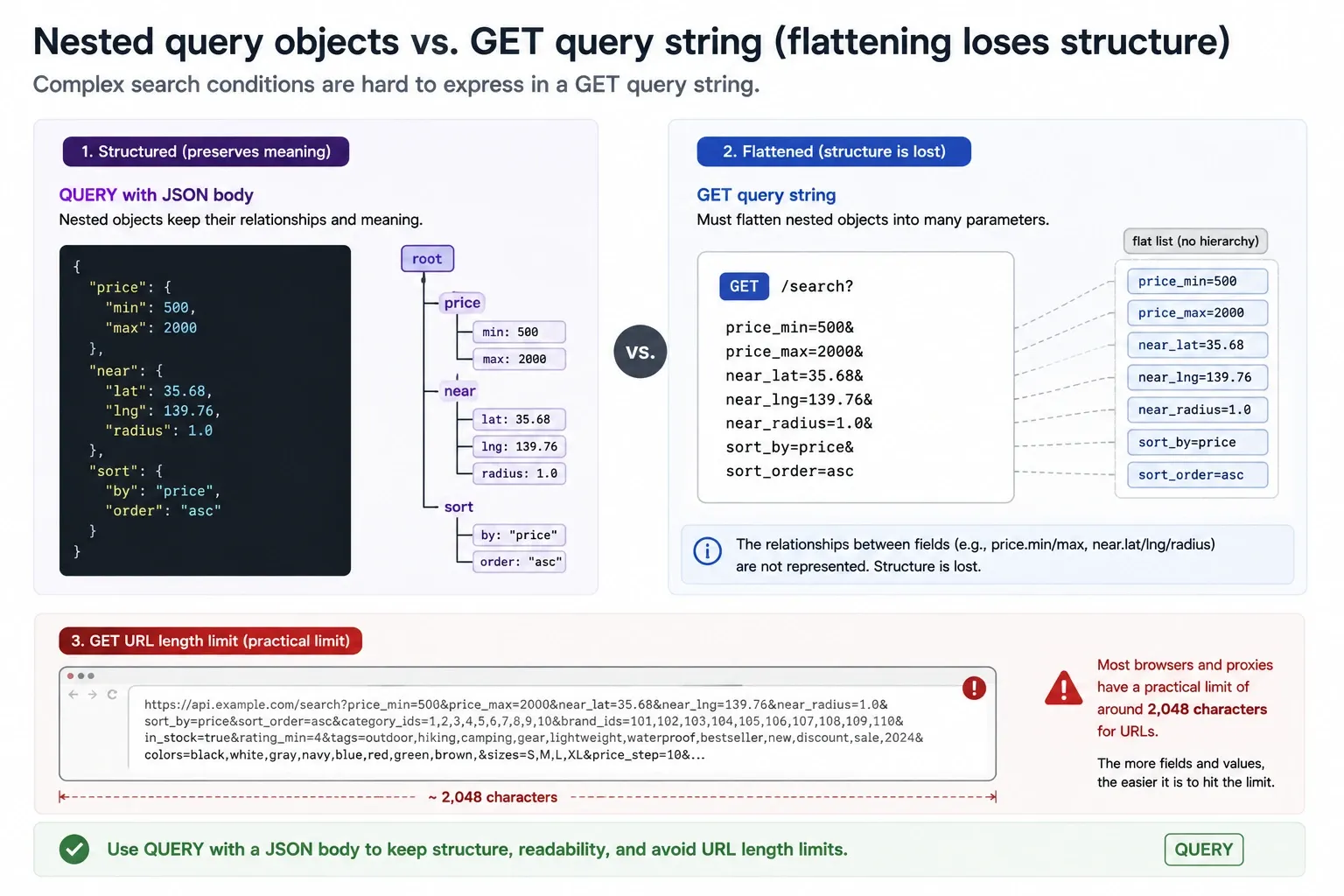
- GET is safe, idempotent, and cacheable but cannot carry a body. Complex search conditions must be crammed into the URL query string, and you struggle with the URL length limit (about 2,048 characters in practice) and expressing nested structures
- POST can carry a body but has the semantics of “an operation that changes state”. Because proxies and caches judge it to “have side effects”, caching is hard to apply and automatic retries are not safe
QUERY is a method that maintains GET’s safety, idempotency, and cacheability while being able to send a structured request body like POST.
What safe, idempotent, and cacheable are, and why they matter
Here is each of the three properties from the table above, concretely.
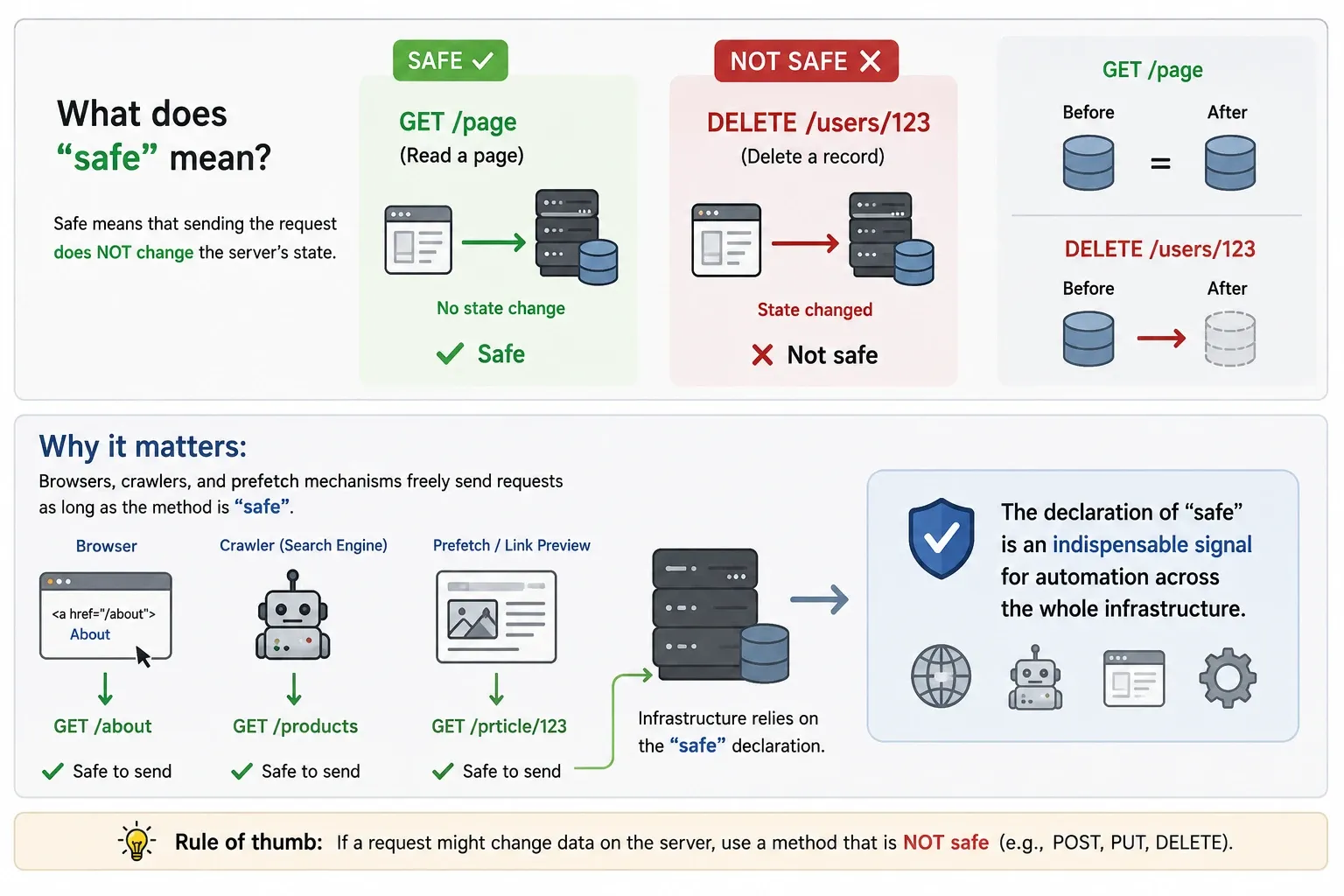
Safe
Means that sending the request does not change the server’s state. Reading a page with GET is safe; deleting a record with DELETE is not.
Why it matters: browsers, crawlers, and prefetch mechanisms freely send requests as long as the method is “safe”. In 2005, when Google Web Accelerator prefetched links, DELETE operations disguised as GET fired and users’ data was deleted. The declaration of “safe” is an indispensable signal for automation across the whole infrastructure.
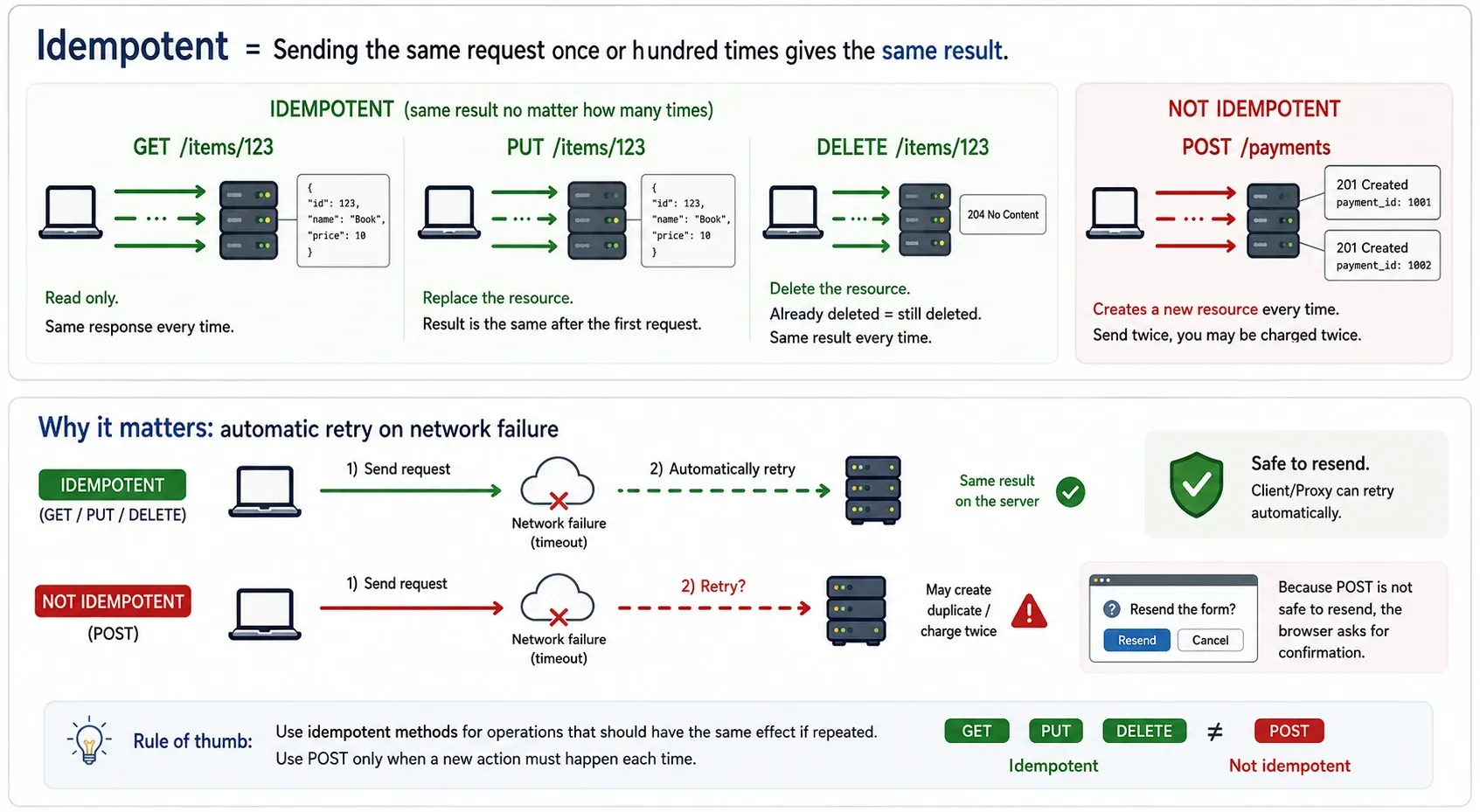
Idempotent
Means that sending the same request once or a hundred times gives the same result. GET, PUT, and DELETE are idempotent. POST is not (send a payment twice and you may be charged twice).
Why it matters: automatic retry on network failure. If a request times out, a client or proxy can automatically resend an idempotent method. Because resending POST is not safe, the browser shows a “resend the form?” confirmation dialog.
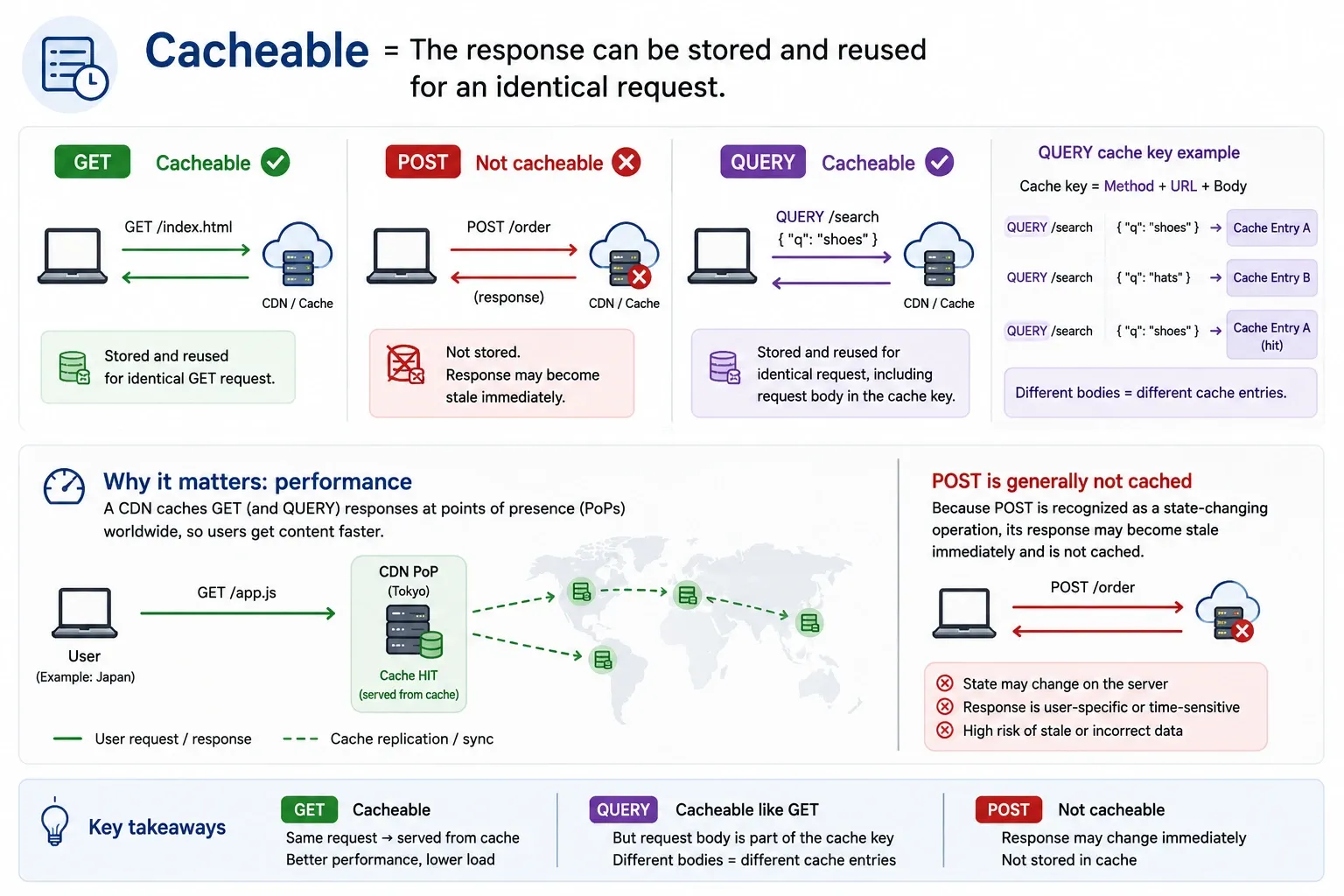
Cacheable
Means the response can be stored and reused for an identical request.
Why it matters: performance. A CDN caches GET responses at points of presence worldwide. POST responses are generally not cached, because the caching mechanism recognises POST as a state-changing operation and the response may become stale immediately. QUERY is cacheable like GET, but because it includes the request body in the cache key, different query bodies use different cache entries.
QUERY is not a replacement for GET or POST
QUERY is not a replacement for existing methods; it fills use cases that had no appropriate method until now.
| Use case | Appropriate method | Reason |
|---|---|---|
| Fetch a resource by URL | GET | Simple, universal, the URL itself is the resource identifier |
| Search with a few parameters | GET | ?q=shoes&color=red fits fine in the URL |
| Create/update/delete a resource | POST/PUT/DELETE | State-changing operations |
| Search with a complex structured query | QUERY | Search conditions exceeding GET’s URL limits |
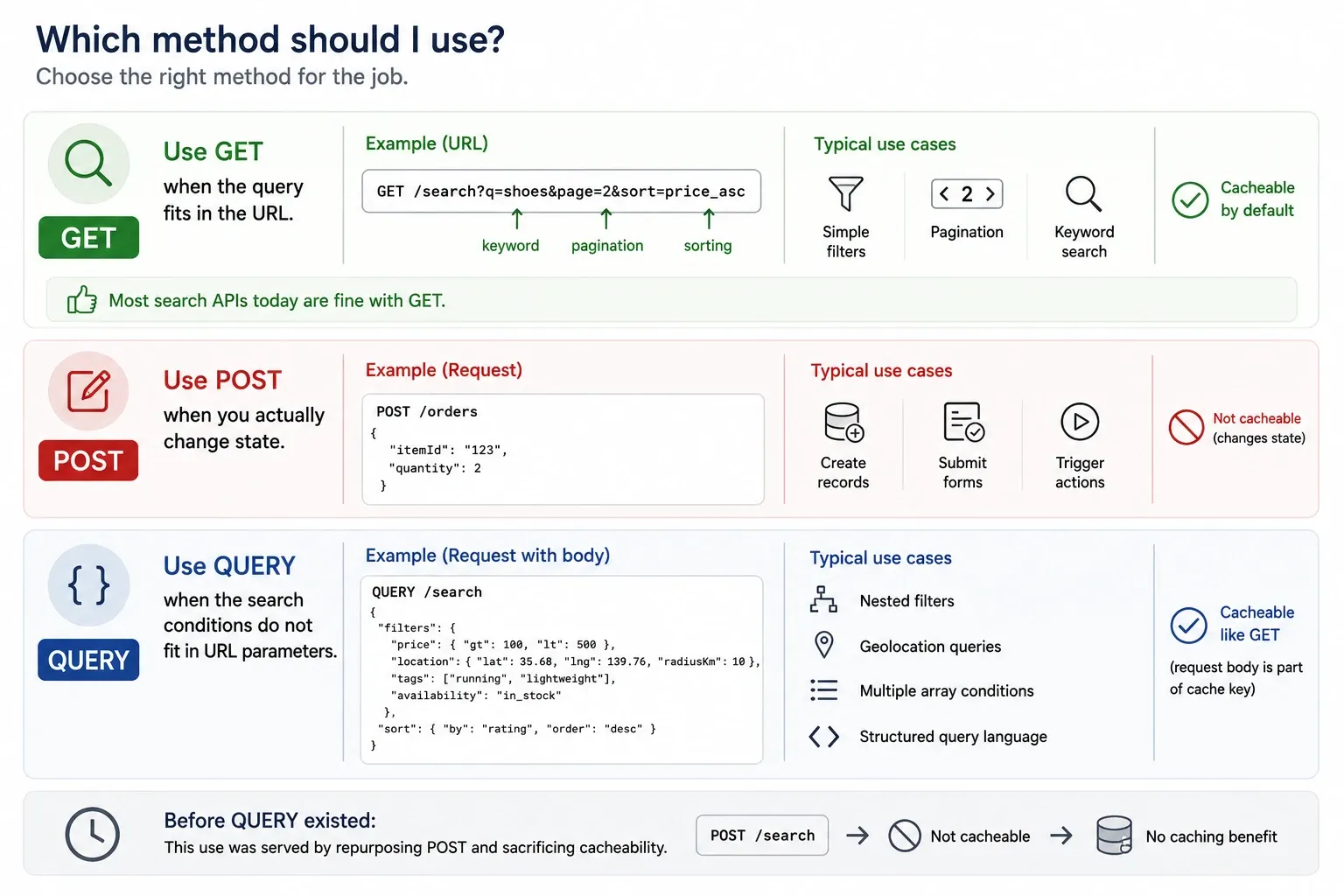
When to use GET: when the query fits in the URL. Simple filters, pagination, keyword search. Most search APIs today are fine with GET.
When to use POST: when you actually change state. Creating records, submitting forms, triggering actions.
When to use QUERY: when the search conditions do not fit in URL parameters. Nested filters, geolocation queries, multiple array conditions, sending a structured query language. Before QUERY existed, this use was served by repurposing POST and sacrificing cacheability.
Why it did not exist until now
The co-authors of RFC 10008 are Cloudflare’s James Snell and Akamai’s Mike Bishop. That engineers from the two big CDN companies wrote the spec suggests QUERY support at the CDN level may materialise relatively early.
For years, the “POST /search” pattern was the de facto standard for search APIs, but semantically this means “create a search resource”, diverging from reality. The QUERY method fundamentally solves this problem.
Prerequisites and environment
- Python 3.12+
- Starlette 0.46+ (ASGI framework)
- uvicorn 0.34+
- httpx 0.28+ (client)
- uv (package manager)
The demo code is in this repository:
https://github.com/oharu121/http-query-method-rfc10008-demo
Overview of the demo
Using a product-catalog search API, I run the same search condition with the three methods GET, POST, and QUERY and compare the differences.
An example search condition:
{ "categories": ["laptops", "phones"], "price": {"min": 500, "max": 2000}, "tags": ["pro"], "min_rating": 4.5, "in_stock": true, "near": {"lat": 35.68, "lng": 139.76, "radius_deg": 1.0}, "sort": {"field": "price", "order": "desc"}}The meaning of each field:
| Field | Type | Description |
|---|---|---|
categories |
string[] | Target categories. Multiple specified as an array (OR condition) |
price |
object | Price range. Nested range via min/max |
tags |
string[] | Product tags. Match all in the array (AND condition) |
min_rating |
number | Minimum rating (0–5) |
in_stock |
boolean | Narrow to in-stock products only |
near |
object | Nearby search by geolocation. Latitude, longitude, and radius specified nested |
sort |
object | Sort condition. Target field and ascending/descending specified nested |
Note that price, near, and sort are nested objects. Trying to express these in a GET query string requires flattening them like price_min=500&price_max=2000&near_lat=35.68&near_lng=139.76&near_radius=1.0, and the structure is lost. The more fields, the longer the URL, and it quickly reaches the practical limit (about 2,048 characters).
Server implementation
Project setup
[project]name = "http-query-demo"version = "0.1.0"requires-python = ">=3.12"dependencies = [ "starlette>=0.46", "uvicorn>=0.34", "httpx>=0.28",]uv syncuv run uvicorn server:app --reloadRouting the QUERY method
As of June 2026, most web frameworks do not natively support the QUERY method. In Starlette, I handled it by passing a custom method name to the methods parameter of Route.
async def search_dispatcher(request: Request) -> JSONResponse:    """Dispatch to a handler according to the HTTP method"""    match request.method:        case "GET":            return await search_via_get(request)        case "POST":            return await search_via_post(request)        case "QUERY":            return await search_via_query(request)        case "OPTIONS":            return await product_search_options(request)        case _:            return JSONResponse(                {"error": f"Method {request.method} not allowed"},                status_code=405,                headers={"Allow": "GET, POST, QUERY, OPTIONS"},            )
routes = [    Route(        "/products/search",        search_dispatcher,        methods=["GET", "POST", "QUERY", "OPTIONS"],    ),]
app = Starlette(routes=routes)
The point is that Starlette’s Route accepts any string in the methods list. It is not that the framework explicitly supports “QUERY”; it is that it accepted an unknown method name.
The GET handler: the limit of a flat query string
async def search_via_get(request: Request) -> JSONResponse:    params = request.query_params    query: dict[str, Any] = {}
    if cats := params.get("categories"):        query["categories"] = cats.split(",")    if price_min := params.get("price_min"):        query.setdefault("price", {})["min"] = int(price_min)    if price_max := params.get("price_max"):        query.setdefault("price", {})["max"] = int(price_max)    # ... individual params like near_lat, near_lng, near_radius are needed
To express nested structures (price.min, near.lat), you have to define a flat parameter-name convention (price_min, near_lat) yourself. This requires an implicit agreement between client and server, and expressing it in an OpenAPI schema becomes cumbersome.
The POST handler: it works, but the semantics are wrong
async def search_via_post(request: Request) -> JSONResponse:    body = await request.body()    content_type = request.headers.get("content-type", "")    if "json" not in content_type:        return JSONResponse(            {"error": "Content-Type must be application/json"},            status_code=415,        )
    query = json.loads(body)    data = search_products(query)    return JSONResponse(data)
The code is simple, but the problem is HTTP semantics.
- Proxies and CDNs see POST as “an operation with a state change” and do not cache the response
- Automatic retry on network failure is not safe (sending the same POST twice may cause the side effect twice)
- The browser’s back button asking “resend the form?” is also an expression of POST not being safe
The QUERY handler: an RFC 10008-compliant implementation
async def search_via_query(request: Request) -> JSONResponse:    body = await request.body()
    # RFC 10008 §3: a Content-Type header is mandatory    content_type = request.headers.get("content-type", "")    if not content_type:        return JSONResponse(            {"error": "QUERY requests MUST include a Content-Type header (RFC 10008 §3)"},            status_code=400,        )
    # RFC 10008 §3: for an unsupported media type, respond 415 + notify supported types with Accept-Query    if "json" not in content_type:        return JSONResponse(            {"error": f"Unsupported media type: {content_type}"},            status_code=415,            headers={"Accept-Query": '"application/json"'},        )
    # RFC 10008 §4: a QUERY response is cacheable    # include a hash of the request body in the cache key    cache_key = _cache_key("QUERY", request.url.path, body)    if cached := _get_cached(cache_key):        return JSONResponse(cached, headers={"X-Cache": "HIT"})
    try:        query = json.loads(body)    except json.JSONDecodeError as e:        # RFC 10008 §3: syntactically correct but semantically unprocessable → 422        return JSONResponse(            {"error": f"Unprocessable query content: {e}"},            status_code=422,        )
    data = search_products(query)    _set_cache(cache_key, data)
    return JSONResponse(        data,        headers={            "X-Cache": "MISS",            "Accept-Query": '"application/json"',        },    )
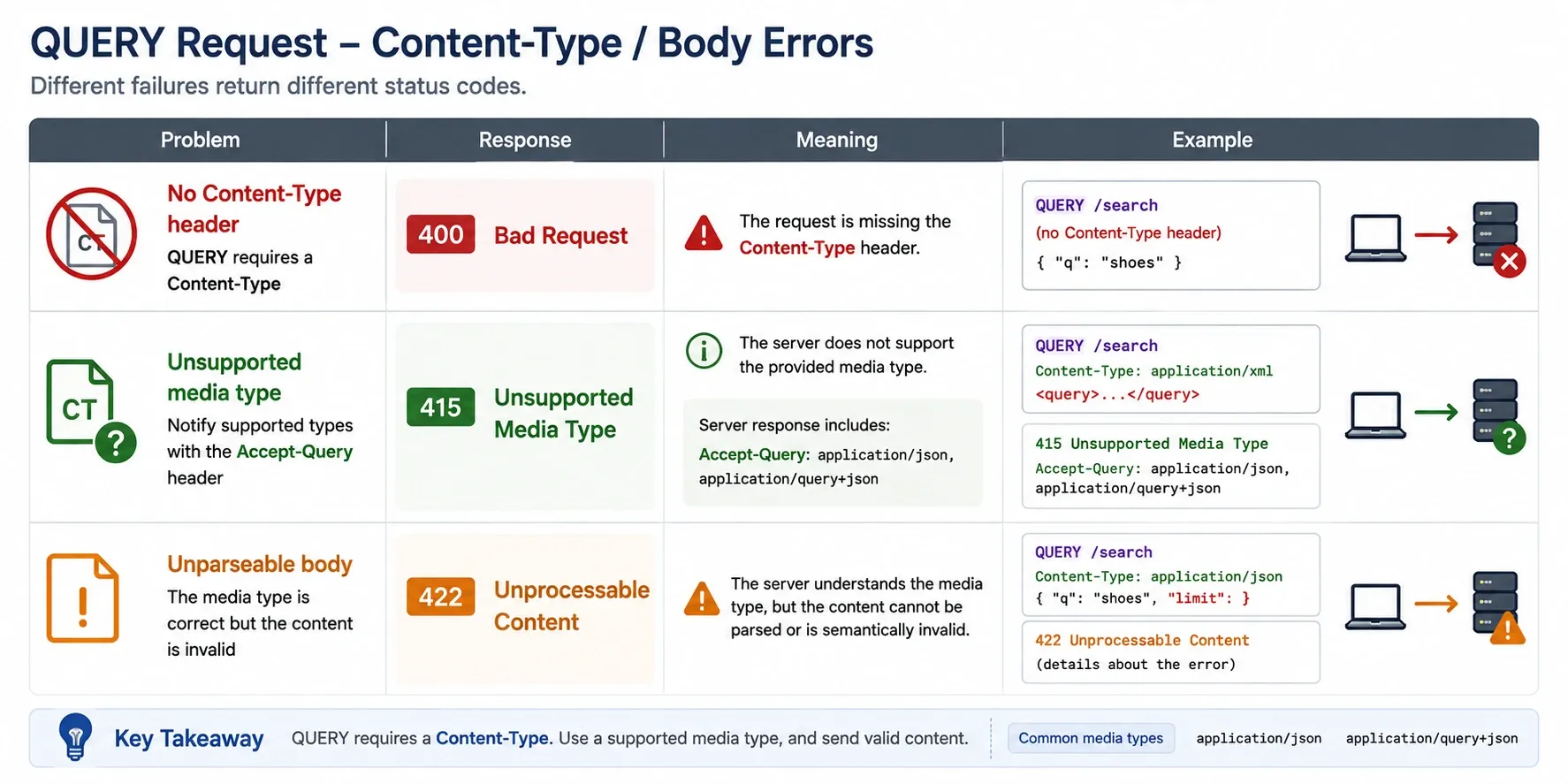
The error-handling points RFC 10008 defines:
| Situation | Status code | Description |
|---|---|---|
| No Content-Type header | 400 Bad Request | QUERY requires a Content-Type |
| Unsupported media type | 415 Unsupported Media Type | Notify supported types with the Accept-Query header |
| Unparseable body | 422 Unprocessable Content | The media type is correct but the content is invalid |
Implementing the cache
QUERY’s biggest advantage is cacheability. Unlike GET, the cache key must include not only the URI but also the request body.
def _cache_key(method: str, path: str, body: bytes) -> str: body_hash = hashlib.sha256(body).hexdigest()[:16] return f"{method}:{path}:{body_hash}"RFC 10008 §4 allows a cache to normalise “semantically insignificant differences” in the body. For JSON, for example, differences in key order or indentation can be ignored. However, if the client specifies the no-transform cache directive, normalisation must not be performed.
Verifying it works
Send a QUERY request with curl
curl -s -D - -X QUERY "http://localhost:8000/products/search" \ -H "Content-Type: application/json" \ -d '{ "categories": ["laptops", "phones"], "price": {"min": 500, "max": 2000}, "tags": ["pro"], "min_rating": 4.5, "in_stock": true, "near": {"lat": 35.68, "lng": 139.76, "radius_deg": 1.0}, "sort": {"field": "price", "order": "desc"} }'Because curl can specify any HTTP method with -X QUERY, it works as-is.
The first response (cache MISS)
HTTP/1.1 200 OKx-search-method: QUERYx-cache: MISSx-cache-key: QUERY:/products/search:7f73fb16e7395e7daccept-query: "application/json"x-note: Safe + idempotent + cacheable + structured body (RFC 10008)
{"total":1,"offset":0,"limit":10,"results":[{"id":4,"name":"iPhone 16 Pro",...}]}
The second response (cache HIT)
Resending the same request:
HTTP/1.1 200 OKx-search-method: QUERYx-cache: HITx-cache-key: QUERY:/products/search:7f73fb16e7395e7dIt hits with the same cache key. This caching behaviour cannot, by spec, be achieved with POST.
Python client (httpx)
import httpximport json
SEARCH_QUERY = {    "categories": ["laptops", "phones"],    "price": {"min": 500, "max": 2000},    "tags": ["pro"],}
with httpx.Client(base_url="http://localhost:8000") as client:    # httpx supports a custom HTTP method via the request() method    resp = client.request(        "QUERY",        "/products/search",        content=json.dumps(SEARCH_QUERY),        headers={"Content-Type": "application/json"},    )    print(resp.json())
Because httpx’s client.request() accepts any HTTP method name as its first argument, it can send a QUERY request with no special handling.
Visualising GET’s URL-length problem
From the Python client’s run, check GET’s URL length:
GET /products/search?... (flat query string) → URL length: 212 charsEven with this simple search condition, 212 characters. In practice search conditions can reach 20–30 items, quickly hitting the URL’s practical limit (about 2,048 characters).
Checking error handling
No Content-Type → 400: QUERY requests MUST include a Content-Type header (RFC 10008 §3)Wrong Content-Type → 415: Unsupported media type: text/plain Accept-Query header: "application/json"Malformed JSON → 422: Unprocessable query content: ...Thanks to the Accept-Query header, the client can automatically learn “which media types of QUERY this endpoint accepts”.
Important spec points of the QUERY method
The Accept-Query header
The server can return Accept-Query in the response header to notify the media types it supports for QUERY.
Accept-Query: "application/json", application/sql;charset="UTF-8"This becomes the content-negotiation basis for supporting query languages other than JSON (SQL-like, JSONPath, etc.) in the future.
Redirect behaviour
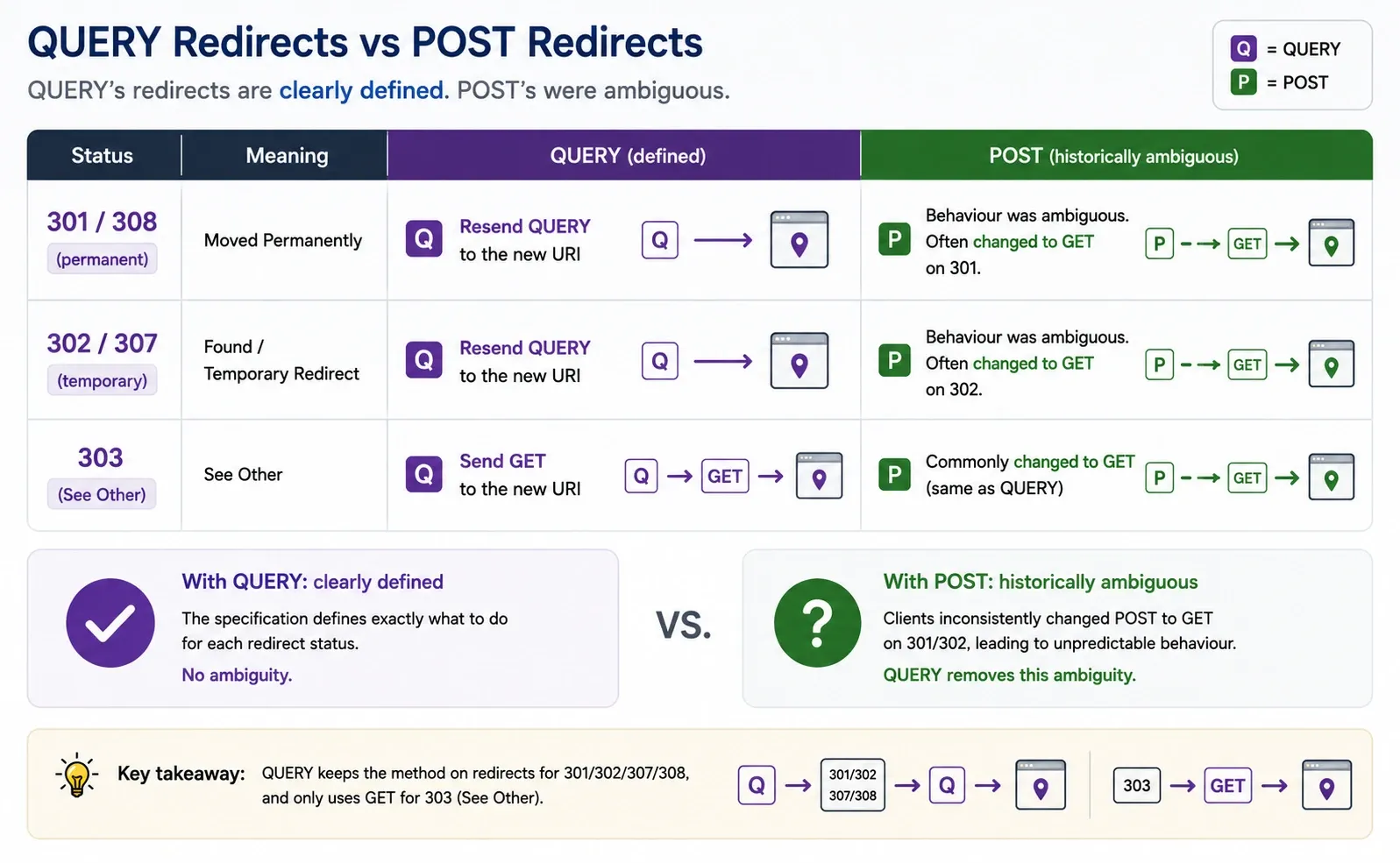
QUERY’s redirects differ from POST’s:
| Status | Behaviour |
|---|---|
| 301/308 (permanent) | Resend QUERY to the new URI |
| 302/307 (temporary) | Resend QUERY to the new URI |
| 303 (See Other) | Send GET to the new URI |
With POST there was ambiguous behaviour where the method changed to GET on 301/302, but with QUERY it is clearly defined.
The CORS impact
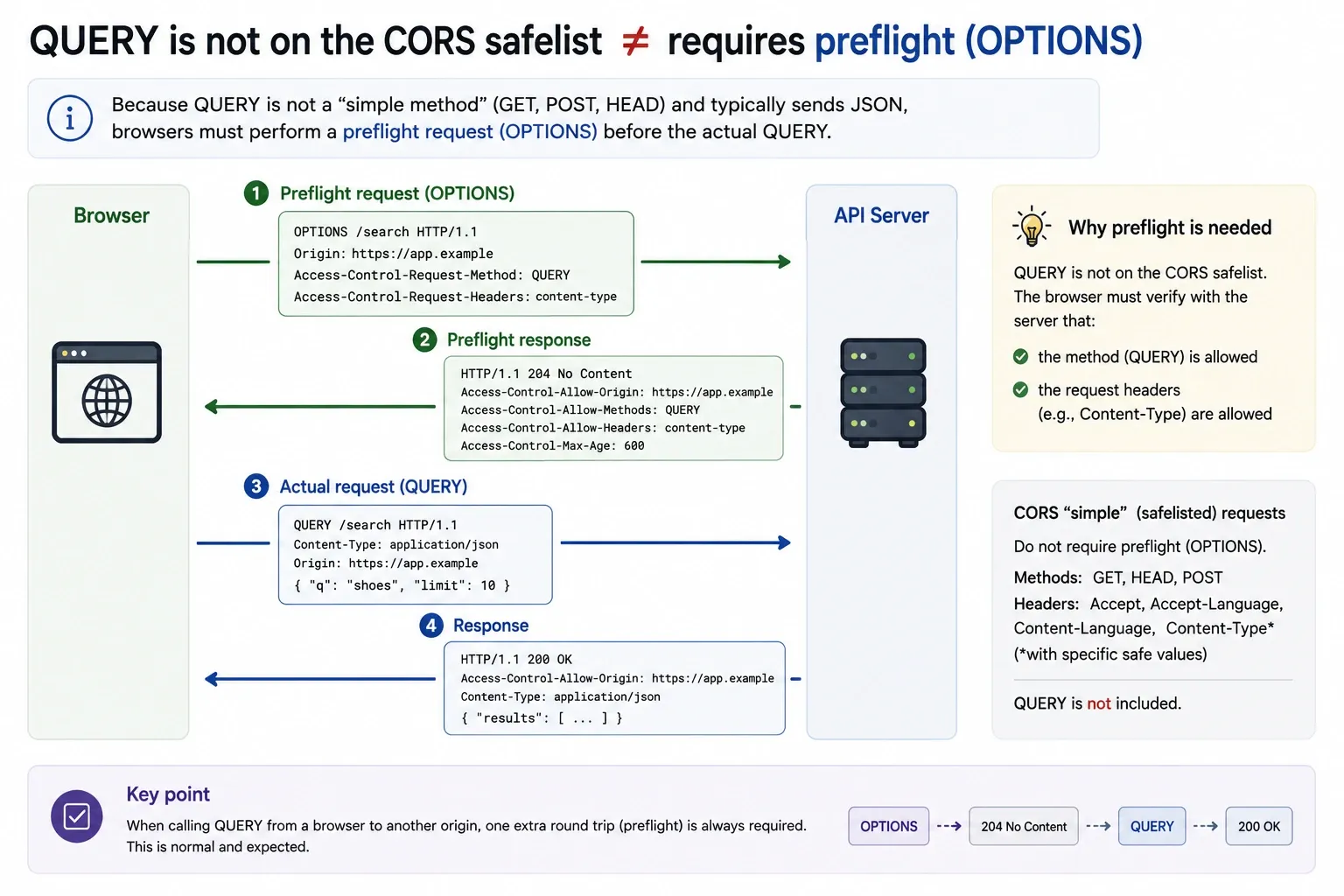
Because QUERY is not on the CORS safelist, sending from a browser requires a preflight request (OPTIONS).
Access-Control-Allow-Methods: GET, POST, QUERY, OPTIONSThis may affect performance in browser clients (an extra round trip occurs).
The relationship with GraphQL: complementary, not competing
You might wonder, “is the QUERY method trying to solve the same problem as GraphQL?” In short, they are complementary, not competing. The two operate at different layers.
| GraphQL | HTTP QUERY | |
|---|---|---|
| What it is | A query language + runtime | A transport method |
| Layer | Application layer (how to express a query) | Protocol layer (how to send a query) |
| What it defines | Schema, types, resolvers, field selection | A request’s safety, idempotency, cacheability |
GraphQL defines what to query, and HTTP QUERY defines how to send that query over HTTP.
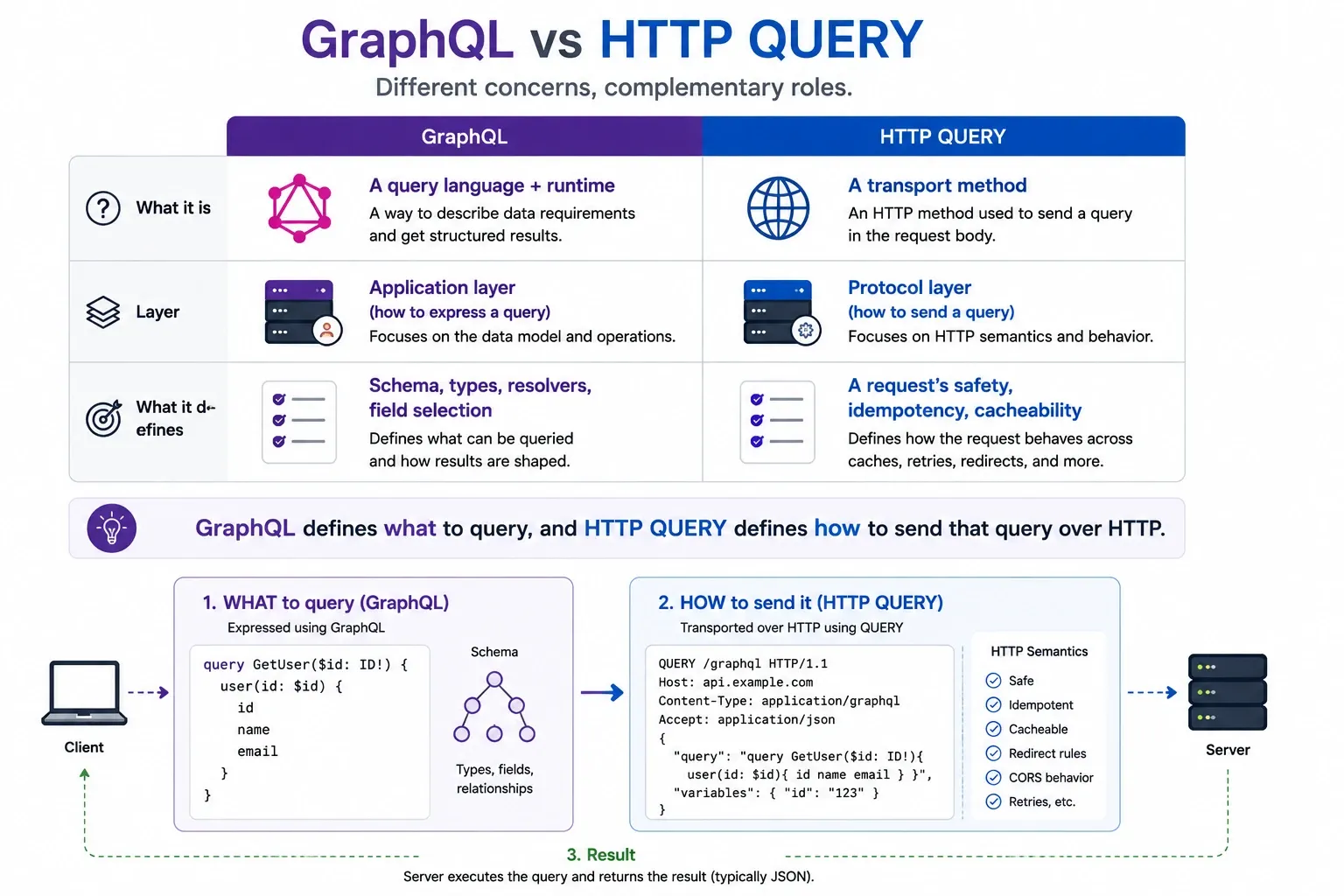
GraphQL’s current transport problem
GraphQL today mainly sends queries with POST:
# the common way GraphQL is sent todaycurl -X POST https://api.example.com/graphql \ -H "Content-Type: application/json" \ -d '{"query": "{ products(category: \"laptops\") { name price } }"}'So GraphQL inherits POST’s problems directly:
- CDNs do not cache the response (POST is seen as a state change)
- No automatic retry on network failure
- No safety guarantee at the HTTP layer
Some GraphQL implementations also use GET (putting the query in the URL), but complex GraphQL queries quickly hit the URL-length limit.
QUERY can improve GraphQL’s transport
Send GraphQL read queries with the QUERY method and you get both benefits:
# GraphQL over HTTP QUERY — the ideal combinationcurl -X QUERY https://api.example.com/graphql \ -H "Content-Type: application/graphql+json" \ -d '{"query": "{ products(category: \"laptops\") { name price } }"}'A CDN can judge “this is safe, idempotent, and cacheable”. GraphQL mutations (data changes) stay POST — mutations actually change state, so POST’s semantics are correct.
The real axis of competition
The market does not need to choose between GraphQL and QUERY. What competes is at the level of API design philosophy:
| Comparison | Competing? |
|---|---|
| GraphQL vs REST | Yes: a difference in API design approach |
| HTTP QUERY vs repurposing POST for search | Yes: QUERY replaces the POST workaround |
| GraphQL vs HTTP QUERY | No: different layers, combinable |
Rather, QUERY is good news for GraphQL teams. Because the HTTP-transport-layer caching problem may be solved without changing GraphQL itself.
The same complementary relationship applies to other protocols that send requests with POST, such as JSON-RPC and gRPC-Web.
Framework support (as of June 2026)
| Framework | QUERY support | Notes |
|---|---|---|
| Starlette | Possible as a custom method | Works with methods=["QUERY"] |
| Express.js | app.query() not implemented |
Handled with app.all() + manual dispatch |
| FastAPI | Possible via Starlette | No native decorator |
| Spring Boot | Needs a custom annotation | @RequestMapping(method="QUERY") |
| Ruby on Rails | Under discussion | A proposal is in the forum |
Unless frameworks, reverse proxies, API gateways, CDNs, and WAFs all support it, production use is difficult. That said, the spec’s co-authors being Cloudflare and Akamai engineers suggests CDN-level support may arrive early.
Summary
The HTTP QUERY method of RFC 10008 is the formal answer to the long-standing workaround “you have to use POST for search APIs”.
What QUERY solves:
- Sending a structured request body, which was impossible with GET
- Recovering the safety, idempotency, and cacheability lost with POST
- Explicit content negotiation via the
Accept-Queryheader
Constraints at present:
- Native framework support is nearly nonexistent (though many can handle it as a custom method)
- CDN, proxy, and WAF support is still to come
- CORS preflight is required (for browser-client APIs)
It is not the phase to put into production right now, but it is worth understanding the spec and preparing. In particular, when designing an API with complex search conditions, it is worth keeping “a design easy to migrate to QUERY in the future” in mind.