
A 2 MB PNG became 316 KB WebP — but only before the first commit
Measuring PNG, JPEG and WebP for article figures, why re-compressing the PNG made it larger, and why converting an image git already tracks reclaims nothing.
On this page
Introduction
I regenerated one of this blog’s article figures and the export came out at 2 MB. That is a lot for a diagram, so I asked which format the repository should actually keep: JPEG or WebP.
The delivered size was never the problem. Astro re-encodes every image at build time and serves WebP regardless of what the source file is, so readers were already getting a small one. What 2 MB buys is a permanent entry in git history.
The answer is WebP at quality 90, which measured 316 KB against the PNG’s 1,983 KB with the text indistinguishable at 1:1. The more useful finding is that the format barely matters compared to when the conversion happens: converting an image git already tracks reclaims nothing at all, because the original blob stays in history forever. This article covers the measurements, the two results that contradicted the obvious guess, and the script that now runs before the commit rather than after.
Astro already solved the part everyone optimises
The instinct on seeing a 2 MB image is to worry about page weight. On this site
that worry is misplaced. Every in-body image goes through astro:assets, and
the emitted markup shows what actually reaches a browser:
denoising-loop.webp?origWidth=1402&origHeight=1122&origFormat=webp&w=1402&h=1122&f=webpf=webp is the delivery format, chosen by the build, and origFormat is only
the source it read. Swapping the source from PNG to WebP changes nothing about
what a reader downloads.
So the only consumer left that cares about the source file is git. That reframes the question from image optimisation to repository hygiene, and it changes what “good” means: not the smallest file a browser can decode quickly, but the smallest file that still holds enough fidelity for the build to re-encode from.
Measuring, instead of guessing
Seven encodings of the same 1402×1122 figure, a mix of photographic content and small captions:
Every encoding of the same figure, drawn to scale. Re-compressing the PNG is the tall bar.
Two of these contradicted the obvious guess.
Re-compressing the PNG made it larger. Running it back through an encoder at maximum compression produced 2,247 KB against the original’s 1,983 KB. Whatever exported it had already packed it better than a naive second pass, and “optimise the PNG” would have quietly added 264 KB.
WebP beat JPEG on a photographic image, 316 KB against 342 KB, which is the opposite of the usual rule of thumb. The figure is not purely photographic: it carries small captions over the photographs, and that mixture is where JPEG’s ringing artefacts around hard edges cost it bytes.
What “q90” actually means
q is the quality parameter handed to the encoder, on a scale of 1 to 100. It
is not a percentage of anything. q90 does not mean “90% of the original”, and
the relationship between the number, the file size, and the visible loss is not
linear in either direction.
It is also not a shared unit. JPEG q90 and WebP q90 are two encoders’ separate opinions about what 90 should cost, so lining them up by number is conventional rather than fair. A format can look like it wins purely by interpreting the scale more aggressively.
That is checkable. Encoding both from the same stored file and measuring root-mean-square error per pixel channel, alongside the size:
| encoding | size | RMSE vs source |
|---|---|---|
| JPEG q90 | 327 KB | 3.66 |
| WebP q90 | 306 KB | 2.09 |
| JPEG q80 | 231 KB | 5.11 |
| WebP q80 | 209 KB | 3.97 |
The worry does not apply here. WebP q90 is smaller than JPEG q90 and closer to the source, so it is not buying its size advantage with extra loss. Reading across the table rather than down makes the gap plainer: WebP q80 carries about 8% more error than JPEG q90 while being 36% smaller.
These sizes sit a little below the ones in the chart above because they are encoded from the stored WebP rather than from the original PNG, which no longer exists. Measuring against a common reference is what makes the two encoders comparable; it is not a claim about absolute fidelity to the export.
Checking the text rather than trusting the quality number
A quality setting is a claim about perceptual loss, and this figure’s whole job is legibility. The captions run about 10 pixels tall over noisy photographic backgrounds, which is the worst case for lossy compression.
So the agent cropped the same band from the PNG, from q90 and from q80, and stacked them at 1:1 with no scaling to hide anything. All three were indistinguishable; only the noise patch differed, and it differed by being noise.
That argued for q80 and 219 KB. The stored value is q90 anyway, because the source is not the final artefact. Astro re-encodes from it, so a lossy source gets a second lossy pass, and spending 97 KB to keep a margin before that is cheap.
The margin is the part worth seeing, and it is what survives now that the PNG has been converted and deleted. Taking the stored q90 file and putting it through further passes:
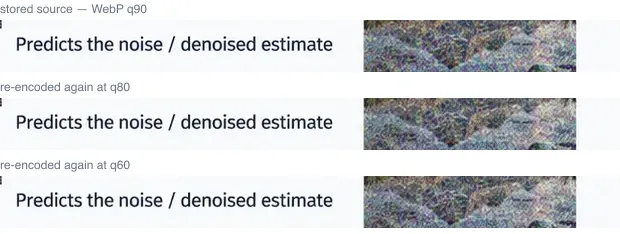
Even at q60, two lossy generations deep and well past anything the build would do, the caption is still clean. That is the headroom q90 was bought for.
The part that actually decides whether any of this works
None of the above matters if the file is already committed.
Git stores every version of every binary as its own object, and objects are immutable. Replacing a 2 MB PNG with a 316 KB WebP in a later commit does not remove the PNG. It adds the WebP alongside it, so the repository now carries 2.3 MB where it carried 2 MB, and every future clone pays for both. Reclaiming the original means rewriting history, which for a shared branch is a far bigger operation than the saving justifies.
The saving therefore only exists in the window between exporting the file and committing it. After that the decision is locked, and “we should optimise those images” becomes advice that costs more than it returns.
That makes this a timing problem wearing a format problem’s clothes, and it is the reason the conversion is now a script rather than a good intention:
function trackedFiles(): Set<string> { const out = execFileSync('git', ['ls-files', '-z', BLOG_DIR], { encoding: 'utf8' }); return new Set(out.split('\0').filter(Boolean));}Anything git already tracks is skipped. Not as a safety catch, but because converting it is genuinely pointless: it costs a rewrite and saves nothing. The skip also stops the script quietly re-encoding the screenshots in an article that has already shipped.
What the script leaves alone
It defaults to PNG only. Converting the existing JPEG figures looked like an easy win until it was measured: a 173 KB JPEG became 161 KB as WebP q90, a 7% saving paid for with a second generation of compression artefacts on an image that already had one. Dropping to q80 saved 36%, by compressing artefacts that were already there.
A fresh PNG export is different in kind. It is lossless, so converting it is the first quality decision anyone makes about that file rather than the second.
--include-jpeg exists for a deliberate one-off cleanup, and is not the default,
because a flag that silently degrades quality by 7% per run is a bad default.
Verification
The two untracked PNGs in the working tree, converted in one pass:
one-component-two-locales.png -> one-component-two-locales.webp 155 KB -> 74 KBdiffusion-denoising-loop.png -> diffusion-denoising-loop.webp 1983 KB -> 316 KB2139 KB -> 389 KB, saved 1749 KB (82%)The rewrite has to touch every locale, since en.mdx and ja.mdx reference the
same path string and a cross-locale figure check fails if only one is updated:
$ pnpm checkResult (77 files):- 0 errors- 0 warnings- 0 hintsAll 20 article(s) consistent.Summary
- Find out what actually consumes the file before optimising it. Astro re-encodes every image for delivery, so the source format only affects what git stores. That is a different target with different criteria.
- Convert before the first commit or not at all. Git objects are immutable, so a later conversion adds a blob rather than replacing one. The saving has an expiry date, and it is the initial commit.
- A second compression pass is not free, and sometimes not even smaller. Re-compressing the PNG added 264 KB. Re-encoding an existing JPEG saved 7% and spent a generation of quality.
- A quality number is an encoder’s opinion, not a unit. JPEG q90 and WebP q90 are not the same amount of loss, so comparing formats by that number needs a measurement behind it. Here WebP came out smaller and closer to the source.
- Check the artefact, not the setting. A 1:1 crop of the smallest text took a minute and settled a question the encoder setting only implied.
References
- Astro image assets: what the build re-encodes and when
- git hash-object and the object model: why a committed blob is permanent
- WebP compression study: Google’s own lossy comparison against JPEG