Colour swatches beside inline hex codes in Astro — why a rehype plugin beat a Swatch component
A rehype plugin for Astro MDX that draws a colour swatch before every inline-code hex colour, chosen over a Swatch component so existing articles need no edits.

On this page
Introduction
I was rereading my logo article, where one paragraph argues that the site accent #1d4ed8 and the seal colour #d8452a clash, and realised it asks the reader to compare two colours they cannot see. VS Code handles the same problem in CSS and similar files by drawing a small square of the colour in front of every hex literal.
I did the same on this blog with a rehype plugin. Every hex code in every existing article, in all three languages, now has a swatch in front of it, so a reader sees at a glance which colour it names.
A swatch inside every inline hex code
VS Code calls the feature color preview, and the editor.colorDecorators setting switches it on and off. This is what it looks like on this site’s own figure tokens:
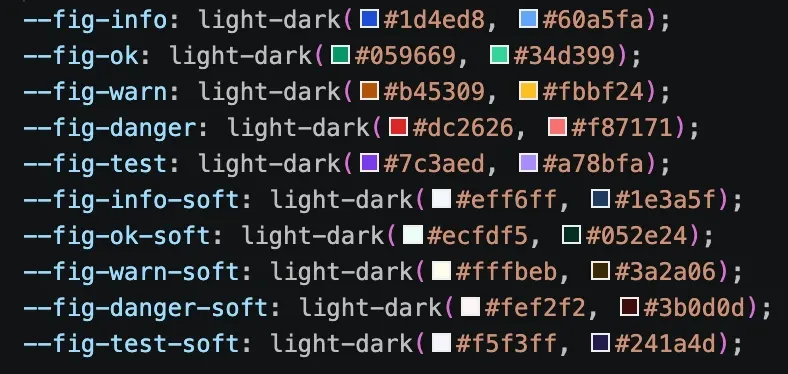
--fig-* tokens in src/styles/global.css.The blog’s version is rehypeColorSwatch, in src/lib/rehype-color-swatch.ts. Rehype is the HTML stage of unified, the syntax-tree toolkit Astro uses to turn Markdown into pages, and a rehype plugin is a function that receives the page as hast, an HTML syntax tree, and edits it in place.
For every inline <code> whose whole text is a hex colour, the plugin inserts an empty <span> in front of the text and hands the colour to CSS as a custom property. The built HTML for #1d4ed8 is:
<code> <span class="color-swatch" aria-hidden="true" style="--swatch:#1d4ed8"></span> #1d4ed8</code>The span holds no text and carries aria-hidden, so copying the code still copies exactly #1d4ed8, and a screen reader reads only the hex. One CSS rule draws the square, sized in em so it scales with the code’s font like a glyph:
.color-swatch { display: inline-block; width: 0.8em; height: 0.8em; margin-inline-end: 0.35em; vertical-align: -0.05em; background: var(--swatch); border: 1px solid var(--text-3); border-radius: 2px;}Registering the plugin takes one import and one entry in the Markdown processor’s plugin array:
import { rehypeColorSwatch } from "./src/lib/rehype-color-swatch.ts";// …markdown: { processor: unified({ rehypePlugins: [rehypeTableScroll, rehypeLinkIcons, rehypeColorSwatch] }),},@astrojs/mdx inherits this Markdown configuration unless extendMarkdownConfig: false turns that off, so the one entry covers every .mdx article. The Japanese and Traditional Chinese files carry the same backticks as the English, and get the same swatches.
Why a rehype plugin and not a <Swatch> component
A component draws a swatch only where an author types one, while the plugin draws one wherever a hex colour already sits in backticks, which is how this blog has always written them. So adding the plugin was the only change, and every published article got its swatches unedited.
| rehype plugin | <Swatch> component | |
|---|---|---|
| What the author writes | #1d4ed8, as before | <Swatch color="#1d4ed8" />, plus an import |
| Existing articles | Swatches on the next build | Every occurrence rewritten by hand |
| Japanese and Chinese files | Same backticks, same swatches | Every occurrence rewritten in each file |
| A hex typed in plain backticks later | Gets a swatch | Renders as plain code |
With a component, plain backticks keep rendering as plain code, so a swatch in any future article depends on its author remembering the component. An AI agent drafting an article would have to be told to use the component instead of backticks too, and even a written rule is not always followed.
Where the plugin looks in the tree
The plugin walks every element except <pre>, tests the text of each <code> it reaches, and also walks into MDX components.
- Inline code only. The walk never enters a
<pre>. Expressive Code, the plugin that renders this site’s fenced code blocks, owns everything inside them, so a hex in a code block stays exactly as written. - Whole text only. A
<code>qualifies when its only child is a text node matching a hex colour.color: #fffgets no swatch. Inside a longer snippet the plugin cannot tell a colour from a lookalike such as the CSS id selector#fade, because unlike VS Code it does not parse the snippet’s language. - Into MDX components. A component such as
<Callout>is not anelementnode in the tree, and the walk has to step into it by name.
The Markdown inside a component is still ordinary hast, but a walk that descends only into element nodes stops at the component’s edge, so a hex code inside a callout gets no swatch while the same code in a paragraph does.
The walk is a hand-written recursion. The highlighted branch is the one that steps into components:
// 3- and 4-digit forms need a letter, so `#447` stays an issue numberconst HEX = /^#(?:[0-9a-f]{6}|[0-9a-f]{8}|(?=[0-9]*[a-f])[0-9a-f]{3,4})$/i;
function addSwatches(node: HastNode): void {  for (const child of node.children ?? []) {    if (child.type === "mdxJsxFlowElement" || child.type === "mdxJsxTextElement") {      addSwatches(child);      continue;    }    if (child.type !== "element") continue;    if (child.tagName === "pre") continue;
    if (child.tagName === "code") {      const color = colorOf(child);      if (color) {        (child.children ??= []).unshift({ /* builds the class="color-swatch" span node, code omitted */ });      }      continue;    }
    addSwatches(child);  }}
A border that stays visible on dark and light backgrounds
This blog outlines its code chips with --border, the token it uses for hairlines. The swatch sits inside the code chip, whose background is within 1.06:1 contrast of a #0b1120 swatch in dark mode and 1.05:1 of a #ffffff swatch in light mode.
For those colours the fill draws nothing and only the border is visible, and a --border outline reaches only 1.28:1 and 1.23:1 against the same swatches.
So I used --text-3, the muted grey this blog uses for secondary text, for the swatch’s border instead. A colour close to the page background still shows as an outlined square. The contrast of each token’s outline against those two swatches:
| Border token | Against #0b1120, dark | Against #ffffff, light |
|---|---|---|
--border | 1.28:1 | 1.23:1 |
--text-3 | 3.96:1 | 4.76:1 |
WCAG 2.2, the W3C’s web accessibility standard, asks for 3:1 contrast on graphical objects a reader needs to see. --text-3 clears it in both themes; --border reaches it in neither.

--border, the swatch for the page’s own background colour all but disappears.
--text-3, both swatches read as squares in both themes.The colour travels in a style attribute
An article can use any hex colour, and I cannot prepare a class for every one. So the plugin writes the colour into style="--swatch: #0b1120", and the CSS rule reads #0b1120 back out with background: var(--swatch) and applies it.
An inline style attribute is governed by the page’s Content Security Policy (CSP), a response header that tells the browser what the page may load and run. This site sends style-src 'self'; style-src-attr 'unsafe-inline'.
style-src-attr 'unsafe-inline' was already in the policy for the colours that Shiki, the highlighter inside Expressive Code, writes onto highlighted code. I covered that decision in my CSP article. The plugin needed no change to the policy.
On a site with no style-src-attr and no 'unsafe-inline' in style-src, the browser blocks every inline style attribute, and every swatch renders as an empty outlined square.
Summary
Hex colours in inline code on this blog now render with a swatch of the colour in front of them, drawn by a rehype plugin rather than a component, so every article picked it up from the backticks it already had. The steps, in short:
- Register it in
markdown.processor, which@astrojs/mdxinherits. - Match inline
<code>whose whole text is the colour. - Skip
<pre>, and walk intomdxJsxFlowElementandmdxJsxTextElement. - Give the swatch a border token that reaches 3:1 against both the dark and the light page background.
- On a site with a CSP, passing the colour as a custom property in
styleneedsstyle-src-attrto allow inline attributes.
References
- hast, the HTML syntax tree format that rehype plugins edit
- mdast-util-mdx-jsx, which defines the mdxJsxFlowElement and mdxJsxTextElement node types
- MDN: the CSP style-src-attr directive and its fallback to style-src
- WCAG 2.2 Understanding SC 1.4.11: Non-text Contrast
- VS Code CSS documentation: syntax coloring and color preview, including editor.colorDecorators