Connecting Claude Code to a Cognito MCP server — a pre-registered client ID, or headersHelper
Two ways to connect Claude Code to an MCP server on Bedrock AgentCore Runtime behind Amazon Cognito, which has no dynamic client registration.

On this page
Introduction
I had an MCP server running on Bedrock AgentCore Runtime, with Amazon Cognito handling inbound auth, and wanted to register it in Claude Code so that /mcp → Authenticate would sign me in through the browser.
The plain claude mcp add stops before any browser opens, with Incompatible auth server: does not support dynamic client registration. Pasting a Cognito access token in as a header connects, until the token expires (one hour by default) and the server comes back as Token has expired.
Claude Code has two OAuth routes and two header routes, and two of the four work against Cognito: a pre-registered app client ID, and headersHelper. The first gives a browser sign-in with token refresh handled by Claude Code; the second mints a fresh token from a script on every connection, so neither needs re-registering when a token runs out.
Four ways Claude Code authenticates to a remote MCP server
An HTTP MCP server in Claude Code authenticates in one of four ways, and they split by who obtains the token. In the two OAuth routes, Claude Code runs the browser flow and stores the token itself. In the two header routes, something outside Claude Code produces the token and Claude Code only forwards it.
| Route | Configured with | Browser sign-in | When the token expires | Works with Cognito |
|---|---|---|---|---|
| OAuth, dynamic registration | nothing (default) | yes | Claude Code refreshes it | no |
| OAuth, pre-registered client | oauth.clientId, oauth.callbackPort | yes | Claude Code refreshes it | yes |
| Static header | headers.Authorization | no | connection fails until you replace it | yes, for one token lifetime |
headersHelper | a command that prints headers | no | the command runs again | yes |
The routes do not combine. Claude Code’s documentation states that once headers.Authorization is set, it “does not fall back to OAuth”, so a rejected header is reported as a failed connection rather than as a server needing sign-in.
Why the default OAuth flow stops at Cognito
Dynamic client registration (RFC 7591) lets an OAuth client create its own client ID by posting to the authorization server’s registration_endpoint. Claude Code uses it by default, which is why a public MCP server needs nothing more than its URL.
Discovery itself works against AgentCore. A request without a token returns a 401 whose WWW-Authenticate header points at the runtime’s RFC 9728 protected-resource metadata, and that names the Cognito user pool as the authorization server. Cognito’s metadata is where the flow ends:
INcurl -s https://cognito-idp.ap-northeast-1.amazonaws.com/ap-northeast-1_XXXXXXXXX/.well-known/openid-configuration | jq '{registration_endpoint, code_challenge_methods_supported, scopes_supported}'OUT{"registration_endpoint":null,"code_challenge_methods_supported":null,"scopes_supported":["openid","email","phone","profile"]}With no registration_endpoint, Claude Code has no way to obtain a client ID and gives up before opening a browser:
✘ Failed to connect — Incompatible auth server: does not support dynamic client registrationCognito also returns 400 for the RFC 8414 path /.well-known/oauth-authorization-server; it serves only the OpenID Connect openid-configuration document. That matters for the pre-registered route below.
The quickest way around all of this is a static header. It connects, but only until the token expires, and then it shows:
Status: ✘ Failed to connectIssue: Server rejected the configured Authorization header (HTTP 401). … Error detail: {"jsonrpc":"2.0","error":{"code":-32001,"message":"Token has expired"}}Browser sign-in with a pre-registered Cognito app client
The MCP authorization spec puts pre-registration first: a client that already holds a client ID for the authorization server should use it before trying anything else. Claude Code supports that through oauth.clientId, which skips the registration step entirely and leaves Cognito nothing it lacks.
The app client needs three things on the Cognito side:
- The authorization code grant and no client secret. Claude Code is a public client and sends PKCE on its own.
- A callback URL of
http://localhost:<port>/callback. Cognito matches callback URLs exactly, so the port has to be fixed. - Its client ID listed in the AgentCore runtime’s
allowedClients, or the token it issues is rejected with a 401 that looks identical to a bad token.
Then register the server with the same port and an explicit metadata URL:
claude mcp add-json my-mcp-server '{ "type": "http", "url": "https://bedrock-agentcore.ap-northeast-1.amazonaws.com/runtimes/<URL-encoded runtime ARN>/invocations?qualifier=DEFAULT", "oauth": { "clientId": "YOUR_APP_CLIENT_ID", "callbackPort": 8765, "authServerMetadataUrl": "https://cognito-idp.ap-northeast-1.amazonaws.com/ap-northeast-1_XXXXXXXXX/.well-known/openid-configuration", "scopes": "openid email profile" }}'callbackPort makes Claude Code listen on the port the app client already trusts instead of a random one. authServerMetadataUrl points it straight at the document Cognito actually serves.
The server now shows as needing authentication rather than as failed, and Authenticate opens the Cognito Hosted UI:
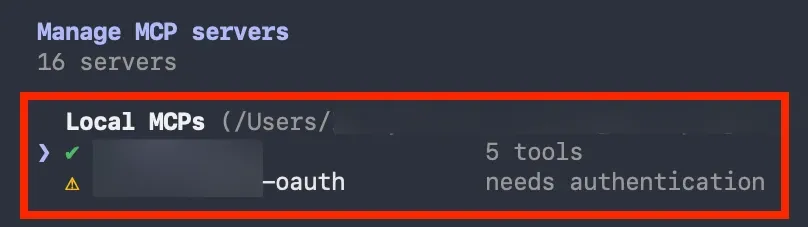
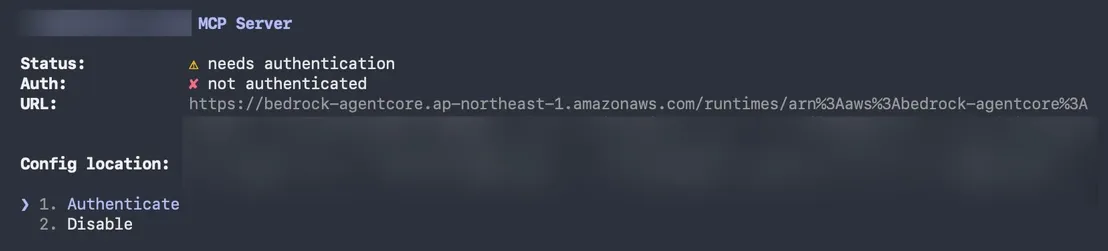
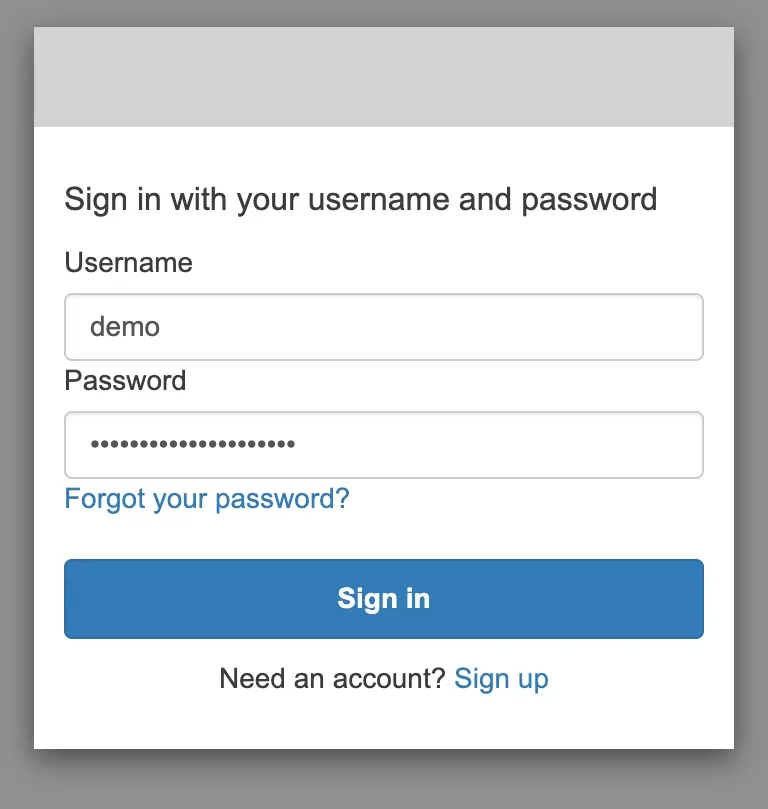
After signing in, the browser hands the code back to Claude Code on the callback port:
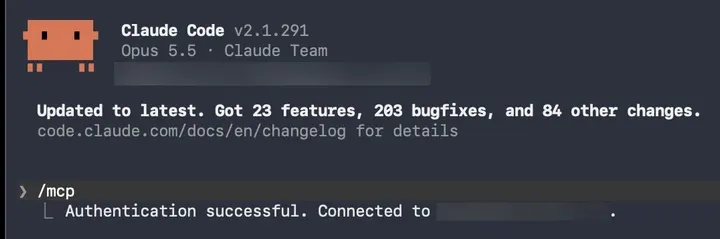
A tool call through the connected server returned results, which confirms that AgentCore accepted the token and not only that Claude Code stored one.
invalid_scope until the scopes are pinned
Without oauth.scopes, the browser never reaches a working sign-in. It lands back on Claude Code’s callback page with an error from Cognito:
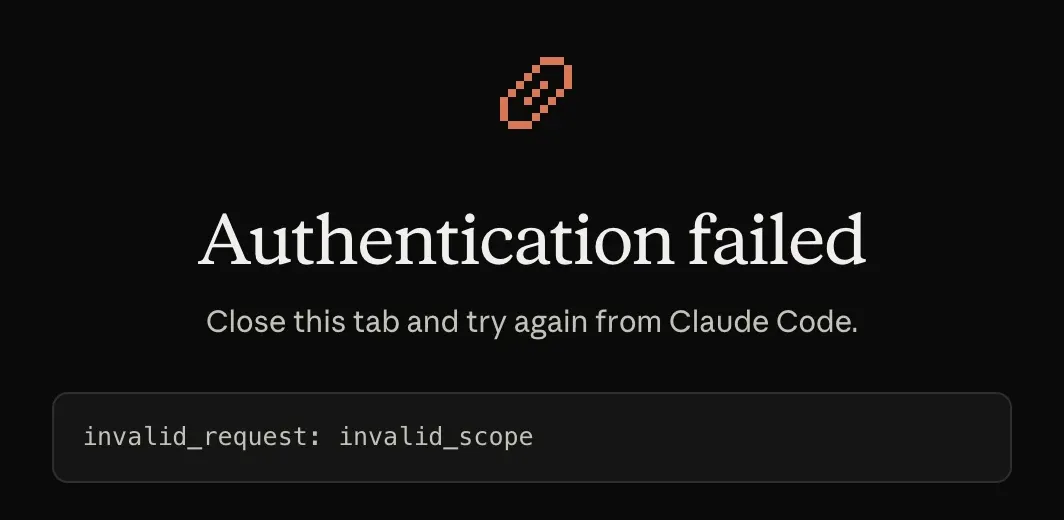
With authServerMetadataUrl set, Claude Code takes the scopes to request from the scopes_supported field of openid-configuration. That file is the user pool’s discovery document, in the format the OpenID Connect standard defines, and it lists every scope the pool supports: openid email phone profile.
Each app client allows its own subset of those, and this one allowed only openid email profile. The request asked for phone, and Cognito refused it.
Pinning "scopes": "openid email profile" to match the app client’s allowed scopes fixed it. Any scope list the app client fully allows works; what fails is requesting one it does not.
A static header that refreshes itself with headersHelper
headersHelper is a command whose standard output Claude Code uses as request headers. It runs on every connection, and when a tool call comes back 401 or 403, Claude Code runs it again, reconnects, and retries once. A helper that mints a fresh Cognito token makes the expiry invisible.
#!/usr/bin/env bashset -euo pipefailcd "$(dirname "$0")/.."source .cognito.env   # COGNITO_CLIENT_ID, COGNITO_USERNAME, COGNITO_PASSWORD, AWS_REGION
TOKEN=$(aws cognito-idp initiate-auth --no-sign-request \  --client-id "$COGNITO_CLIENT_ID" \  --auth-flow USER_PASSWORD_AUTH \  --auth-parameters "USERNAME=${COGNITO_USERNAME},PASSWORD=${COGNITO_PASSWORD}" \  --region "$AWS_REGION" \  --query 'AuthenticationResult.AccessToken' --output text)
printf '{"Authorization": "Bearer %s"}\n' "$TOKEN"
InitiateAuth needs no AWS request signing, so --no-sign-request lets the script run with no AWS credentials at all. Otherwise the script would have to fetch AWS credentials through a credential broker, which can stop at an MFA prompt and wait for a person. The helper has a 10-second timeout, so a prompt nobody answers in time fails the connection.
Two more requirements:
- The app client needs
USER_PASSWORD_AUTHenabled. - AgentCore requires the access token, since it checks the token’s
client_idclaim againstallowedClients.
claude mcp add-json my-mcp-server '{ "type": "http", "url": "https://bedrock-agentcore.ap-northeast-1.amazonaws.com/runtimes/<URL-encoded runtime ARN>/invocations?qualifier=DEFAULT", "headersHelper": "/absolute/path/to/scripts/mcp_headers.sh"}'The first registration printed a warning instead of connecting:
MCP server 'my-mcp-server': headersHelper not run — this workspace has no persisted trust; accept the trust dialog here once interactivelyA helper is a command Claude Code executes, so it only runs in a workspace you have trusted. Claude Code’s documentation describes it as “an arbitrary shell command”.
Starting claude interactively in that directory once and accepting the trust dialog was enough, and the server connected on the next start.
The trade-off against the pre-registered client is where the credential lives. The helper needs a password on disk and an app client with password auth enabled, while the OAuth route keeps only a refresh token that Claude Code stores. The helper works headless and in scripts, where nobody is present to complete a browser sign-in.
If you need real dynamic client registration
Pre-registration means every user’s Claude Code is configured with a client ID ahead of time. That is fine for one team and awkward for a server meant to be added by anyone with its URL.
For clients with no prior relationship, the current MCP authorization spec prefers Client ID Metadata Documents (CIMD) and demotes dynamic registration to a backwards-compatibility option. In CIMD the client ID is an HTTPS URL to a JSON document describing the client, and the authorization server fetches it.
Claude Code already uses it when a server advertises client_id_metadata_document_supported, but Cognito does not advertise it, so CIMD is not available here.
That leaves three workarounds. None of them were tried here; they are the ones other Cognito users and AWS’s AgentCore guide point to. Only the /register endpoint keeps both Cognito and AgentCore’s inbound JWT check.
- A
/registerendpoint in front of Cognito. A small service accepts the RFC 7591 request, callsCreateUserPoolClient, and returns the new client ID, alongside a metadata document that adds theregistration_endpoint. The cost is a public endpoint backed by an admin API: it needs rate limiting, a redirect URI allowlist, and cleanup, since a user pool has a quota on app clients. Each new client would also have to reach AgentCore’sallowedClients. - An OAuth proxy. FastMCP’s Cognito integration answers the dynamic registration itself and forwards everything to one real Cognito app client, so Cognito never sees per-client registrations. This fits a server built on FastMCP’s own auth layer rather than AgentCore’s inbound JWT check.
- An identity provider that supports it. AWS’s AgentCore Runtime MCP guide demonstrates automatic OAuth with Auth0 rather than Cognito, which is the shortest route when the choice of provider is still open.
Summary
- Claude Code’s default OAuth route needs dynamic client registration, and Cognito publishes no
registration_endpoint, so it fails withIncompatible auth server. - A pre-registered Cognito app client gives browser sign-in: set
oauth.clientId, acallbackPortmatching the app client’s callback URL,authServerMetadataUrlpointing atopenid-configuration, andoauth.scopeslimited to what the app client allows. headersHelpergives an auto-refreshing header: a script that callsinitiate-auth --no-sign-requestand prints the access token, run in a trusted workspace.- A static
Authorizationheader disables the OAuth fallback and lasts one token lifetime. - For registration with no prior setup, the MCP authorization spec now prefers CIMD, which Cognito does not support. With Cognito and AgentCore together, a
/registershim is the only option that works directly; otherwise, switch to a different identity provider.
References
- MCP specification 2025-11-25: Authorization, including client registration priority and Client ID Metadata Documents
- Claude Code docs: Connect Claude Code to tools via MCP, including pre-configured OAuth credentials and headersHelper
- RFC 7591: OAuth 2.0 Dynamic Client Registration Protocol
- RFC 9728: OAuth 2.0 Protected Resource Metadata
- OpenID Connect Discovery 1.0: the format of the
openid-configurationdocument - OAuth Client ID Metadata Document draft
- FastMCP: AWS Cognito OAuth integration using an OAuth proxy
- Amazon Bedrock AgentCore: Authenticate and authorize with Inbound Auth and Outbound Auth