Cutting Vercel deployment storage from 13.96 GB to 20.27 MB — previews off, retention down
A Vercel Hobby account went over its 10 GB deployment storage limit. Deployment count was the cause, at 147 MB per build and 189 builds in thirty days.

On this page
Introduction
Vercel’s usage page put a red ring next to Deployment Storage: 13.96 GB against a 10 GB allowance, on an account where nothing else was above 20% of its limit.
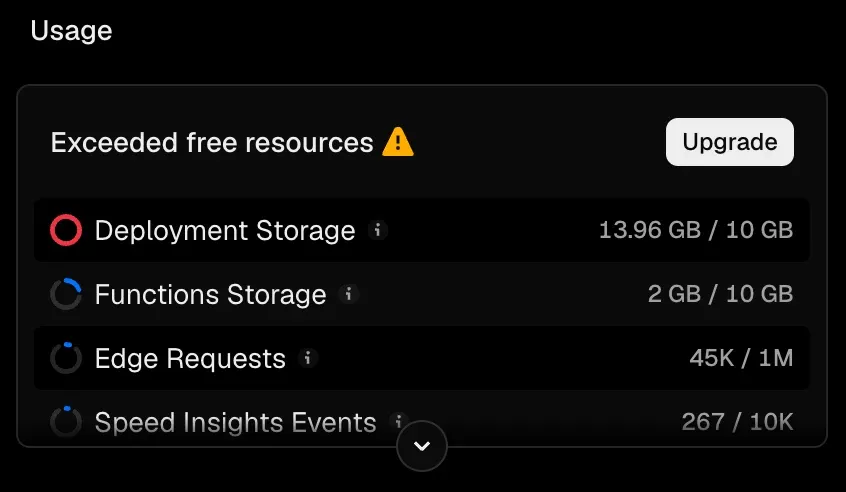
My first question was whether the live site was at risk. It was not, but staying over the line still costs something: Vercel stops honouring the 30-day retention window and deletes eligible deployments immediately, and it can refuse new ones until the account is back under.
The instinct was to blame the repository, since every article here carries diagrams and screenshots. However, the repository is 9.79 MiB packed, and all of its images and video together come to 9.4 MB. One build of this site is 147 MB, and 189 of them had been created in thirty days.
Turning preview builds off, dropping retention to a day and adding a prune to the start of the release flow took the same graph to 20.27 MB.
Reading the quota: 147 MB per build against 9.79 MiB of repository
Deployment Storage measures the build output Vercel keeps for every deployment, which on this site is about fifteen times the size of the repository that produced it.
Both numbers are one command each:
INgit count-objects -vH | grep size-packOUTsize-pack: 9.79 MiBINdu -sm .vercel/outputOUT147 .vercel/outputThe second one is what the quota counts. .vercel/output is what vercel build produces and vercel deploy --prebuilt uploads, and the deployment’s file tree holds 2847 files against 2843 locally, so nothing of consequence is added in transit.
Where the 147 MB sits
Half of every deployment is the server bundle, and 20 MB of that half is a second copy of it.
static/_astro is 893 generated image derivatives across three locales.Inside _render.func sits 29 MB of node_modules, which is the Astro server runtime and everything the article pages import at render time. static/_astro is where Astro writes the processed images, and at 893 files it is three locales’ worth of derivatives for the same source pictures.
Why moving the images off-site would have bought 6%
Every raster and video committed to this repository totals 9.4 MB, so an object-storage bucket would have addressed one part in sixteen of a single deployment.
INfind src -type f \( -name '*.mp4' -o -name '*.png' -o -name '*.jpg' -o -name '*.webp' -o -name '*.avif' \) -exec du -ch {} + | tail -1OUT9.4M totalThe quota counts static/_astro, and Astro generates those derivatives at build time from whatever the source happens to be. Serving the originals from a bucket moves 9.4 MB out of git and leaves the 33 MB of derivatives where they are.
Even halving a 147 MB deployment leaves the space it occupies stacking up with every deployment, so managing the size of one deployment is not where this gets solved.
189 deployments in thirty days
Storage is build size times deployment count, and the count was the term nobody had looked at.
GitHub records a deployment for each one, so the count comes from the repository rather than from Vercel:
gh api "repos/<owner>/<repo>/deployments?per_page=100" --paginateGrouped by creator over the preceding thirty days, that returns 122 deployments created by vercel[bot] against the Preview environment, and 67 created by this repository’s own CI against production.
At 147 MB each, 189 deployments is 27.8 GB pushed through a 10 GB allowance in a month.
The 122 previews nobody opened
Two thirds of the deployments were previews for branches that had been merged and deleted, and every one of them was built automatically.
The four still alive when the account went over show why. Each was the most recent preview of its branch, each of those branches had been squash-merged and deleted, and git ls-remote --heads origin listed none of them.
Vercel keeps the latest preview of an active branch, and it had not noticed these branches had stopped existing.
Previews off, retention down, and a prune
Three settings, each aimed at a different term of that product: how often a deployment is created, how long it is kept, and how many are sitting there right now.
Turning the Git integration off
Vercel’s Git integration creates a deployment for every push, on every branch, by default. Each of those deployments occupies 147 MB of Deployment Storage.
This site needs none of them: production is deployed by GitHub Actions, and the deployments on other branches are not needed either.
{ "git": { "deploymentEnabled": false }}That stops the deployments the Git integration creates on its own, on main and on every other branch.
Retention is four dropdowns in Project Settings
Retention lives in the dashboard, under Project Settings, Build and Deployment, Deployment Retention Policy. Every project on this account was sitting at the plan default:
| Deployment type | Before | After |
|---|---|---|
| Canceled | 30 days | 1 day |
| Errored | 30 days | 1 day |
| Pre-Production | 30 days | 1 day |
| Production | 30 days | 1 day |
Thirty days is the Hobby maximum, so the default is also the slowest setting available. All four went to the shortest one instead.
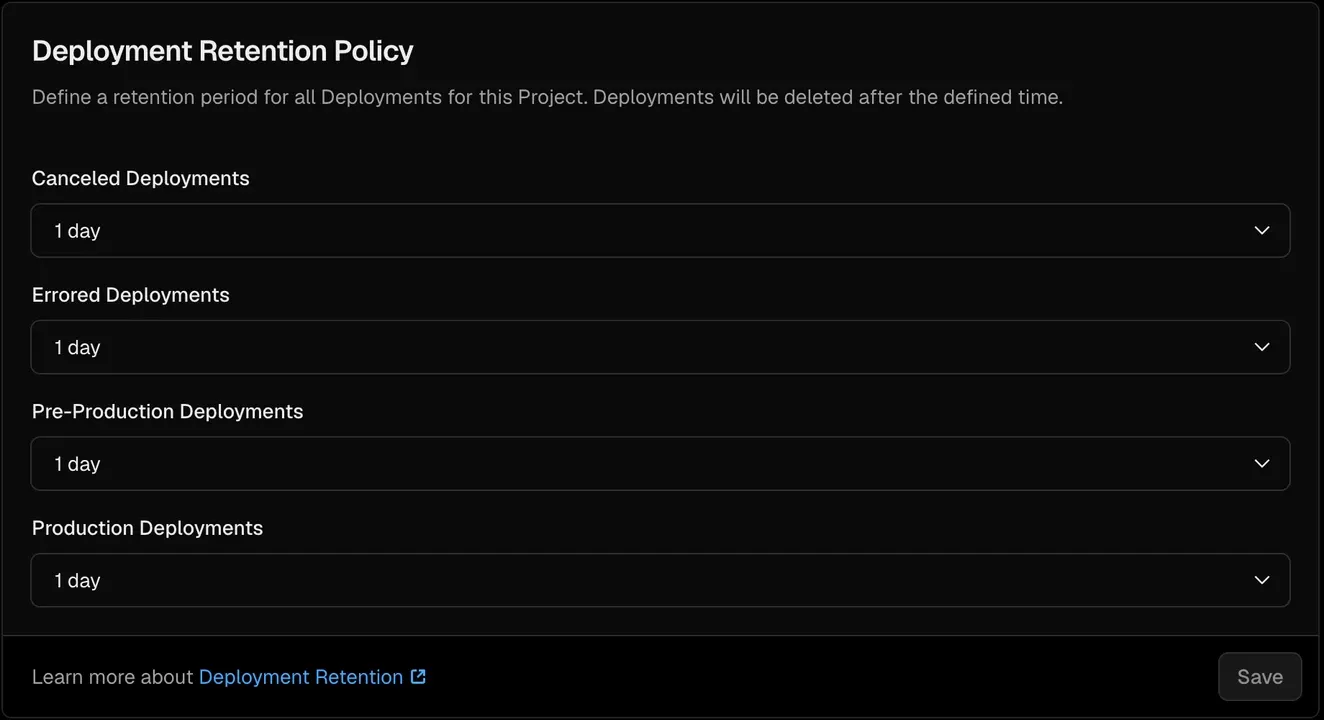
Pre-Production Deployments is the row that covers previews. There is no field here for how many deployments to keep.vercel usage cannot report any of this on the Hobby plan:
INpnpm dlx vercel@58 usageOUTError: Billing cost data is unavailable for 2026-09-01 through 2026-09-21.The Hobby plan has no billing record, so the CLI has nothing to read. The GB figure exists only on the dashboard.
What --safe protects, and what it deletes
vercel remove <project> --safe deletes deployments; the same command without --safe deletes the project.
INpnpm dlx vercel@58 remove oharu-tech-blog --safe --yesOUT> Found 8 deployments for removal in oharu121s-projects [1s]> Success! Removed 8 deployments [909ms]--safe skips deployments that hold an alias, so four previews still holding a branch alias were left behind with the live one.
--safe and the four it spared. A preview’s branch alias survives the branch it points at, so the second pass names deployments individually.Of the thirteen deployments this project had, the first pass removed eight and left five: the live production deployment, and four previews still holding branch aliases for branches that no longer existed. Those four came out by URL, checked against git ls-remote first:
INpnpm dlx vercel@58 remove <url> <url> <url> <url> --yesOUT> Found 4 deployments for removal in oharu121s-projects [934ms]> Success! Removed 4 deployments [731ms]Where a prune belongs in a release
A prune runs at the start of a release, because running it at the end deletes the deployment a rollback would target, at the moment production has just changed.
13.96 GB to 20.27 MB
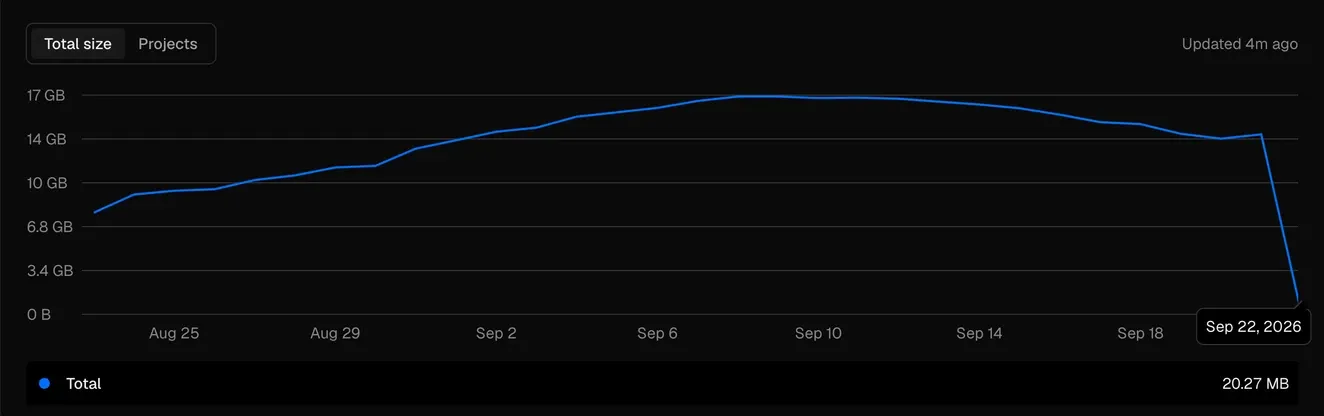
The number is what those three changes produced together: the Git integration’s automatic deployments turned off, all four retention windows set to one day, and the backlog cleared with vercel remove.
Summary
Deployment storage is build size times deployment count, and the count is the easier term to be wrong about. This account had ten projects, 185 live deployments and a 147 MB build, against a repository small enough to be irrelevant to the total.
Three checks separate a storage problem from a repository problem. du -sm .vercel/output gives the size of one deployment, the platform’s own deployment records give the count, and their product against the allowance says whether to make deployments smaller or to make fewer of them.
Where the count is the problem, the settings are git.deploymentEnabled: false for the inflow, a retention policy for the decay, and vercel remove --safe for the backlog. Only the last one frees anything today, and it belongs at the start of a release rather than the end.