Two green GitHub pull requests broke main — require branches to be up to date before merging
Why a GitHub pull request with every check green can still break main, how Require branches to be up to date before merging stops it, and rules for main.

On this page
Introduction
I merge a pull request once every check on it is green. So it was a surprise when one of my pull requests failed CI on a test file it never touched.
The failure was not mine at all. Main itself had gone red right after another pull request merged with every check passing, so every open pull request was now red for a reason outside it. The broken main was also hiding a real bug that no test had run against yet.
The checks on the merged pull request were not wrong, only old. They had run before a different pull request merged, and that pull request added code the merged one broke. GitHub’s Require branches to be up to date before merging makes a merge like that wait for a fresh run.
This article walks through how two green pull requests add up to a red main, and the other rules worth setting on main alongside that one.
How two green pull requests merged into a red main
A green check is a result about one snapshot of main. For a pull_request event, GitHub Actions tests a merge commit of the pull request branch and the base branch, built at the moment the workflow starts. Nothing re-runs that test when the base branch moves later.
That leaves room for this sequence:
- Pull request A runs CI and goes green. CI tested A merged into main as main was at that moment.
- While A waits for review, pull request B merges into main.
- A merges. Its green result was computed against a main that no longer exists, and nothing ran CI on A plus B before they met on main.
Most of the time A and B do not interact, and the stale result is still right. Here they did. Pull request A added four methods to a shared interface and updated the test fakes that implement it. Pull request B, written in parallel, added a new test with its own fake of that interface, implementing the old method set.
They edited different files, so Git merged them without a conflict, and the type checker failed on main (class names shortened):
error: Argument "connector" to "Pipeline" has incompatible type "FakeConnector"; expected "FileConnector" [arg-type]A second break sat behind the type error. Pull request B had also changed a shared error helper so that a 404 from the storage API became the project’s own NotFoundError. Pull request A’s new restore() method still caught the raw 404 to return False, so after both merged, restoring a permanently deleted file raised instead.
A test for exactly that case existed, and it never ran. The CI job stopped at the type check before reaching the test step, so the test only failed once the type error was fixed.
What branch protection is
Branch protection is a set of rules GitHub enforces on a branch before a change can land on it. Typical rules require a pull request instead of a direct push, a number of approving reviews, and passing status checks, and they block force pushes and deletion of the branch.
GitHub offers two ways to configure them. Branch protection rules, under Settings → Branches, allow one rule per branch pattern. Rulesets, under Settings → Rules → Rulesets, are named lists of rules, and several can target the same branch.
When rulesets overlap with each other or with a branch protection rule, the most restrictive version applies. Anyone with read access can view a repository’s active rulesets, so a developer can check what main requires without asking an admin.
Required status checks come in two modes. In GitHub’s terms, a strict check requires the branch to be up to date with the base branch before merging, and a loose check does not. The repository in this story had required checks in loose mode, which is exactly the gap in the timeline above.
Require branches to be up to date before merging
With this setting on, a pull request that is behind its base branch cannot merge. GitHub offers an Update branch button, which brings the latest main into the pull request branch and triggers CI again, and the merge waits for that new run to pass.
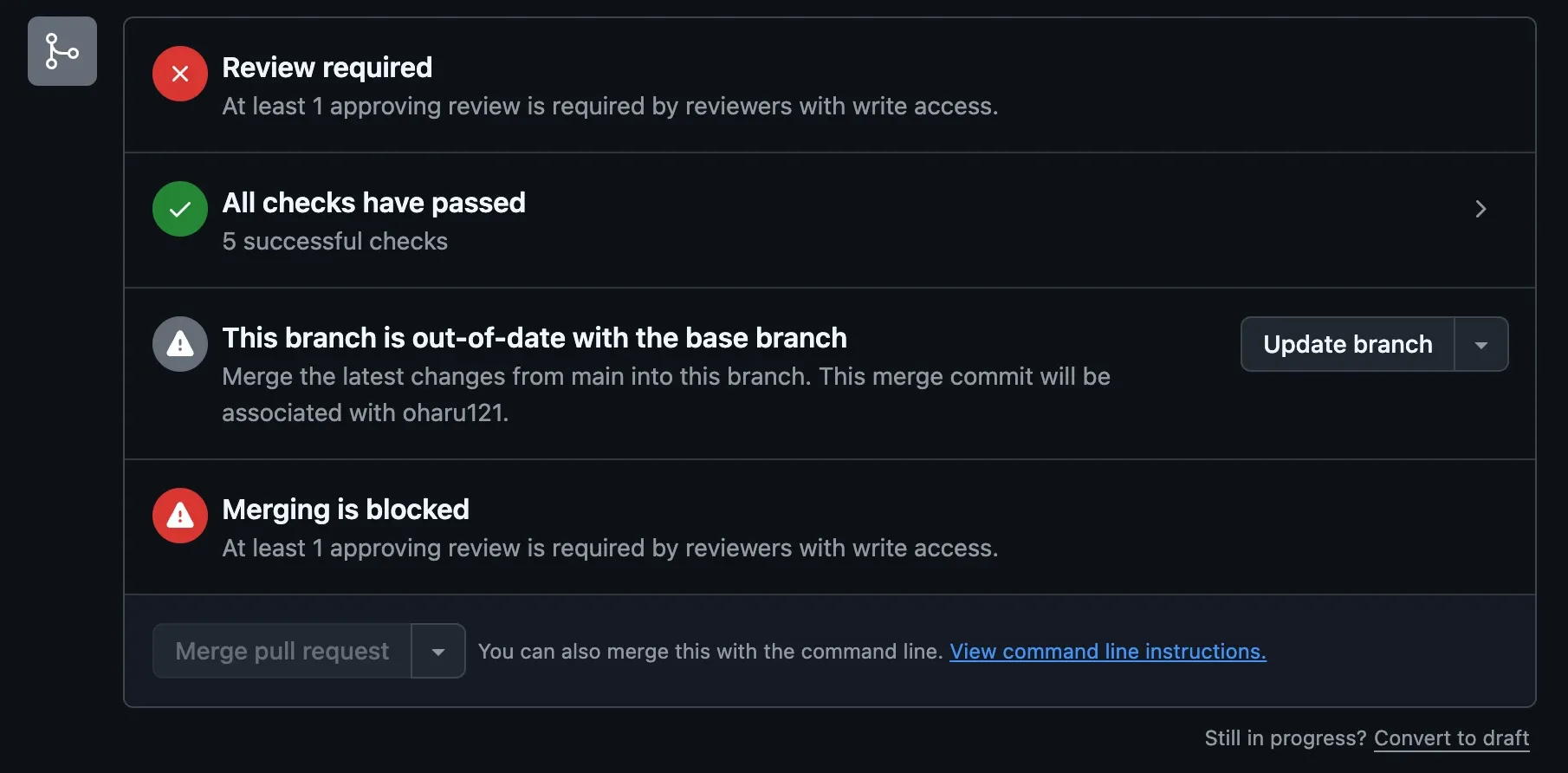
In the timeline above, pull request A would have been held after B merged. Its re-run would have hit the type error, and main would have stayed green.
The cost is re-runs. Every merge into main puts every other open pull request behind it, and each one needs an update and a fresh CI run before it can merge.
With a CI run of about a minute and a half and a small team, that is a short wait per merge. On a busy repository the updates pile up, which is what merge queues are for.
Where the setting lives
It is not a rule of its own. In a ruleset, it appears under Require status checks to pass once that rule is enabled. In a classic branch protection rule, it is the checkbox indented under Require status checks to pass before merging, and it stays hidden until the parent is checked.
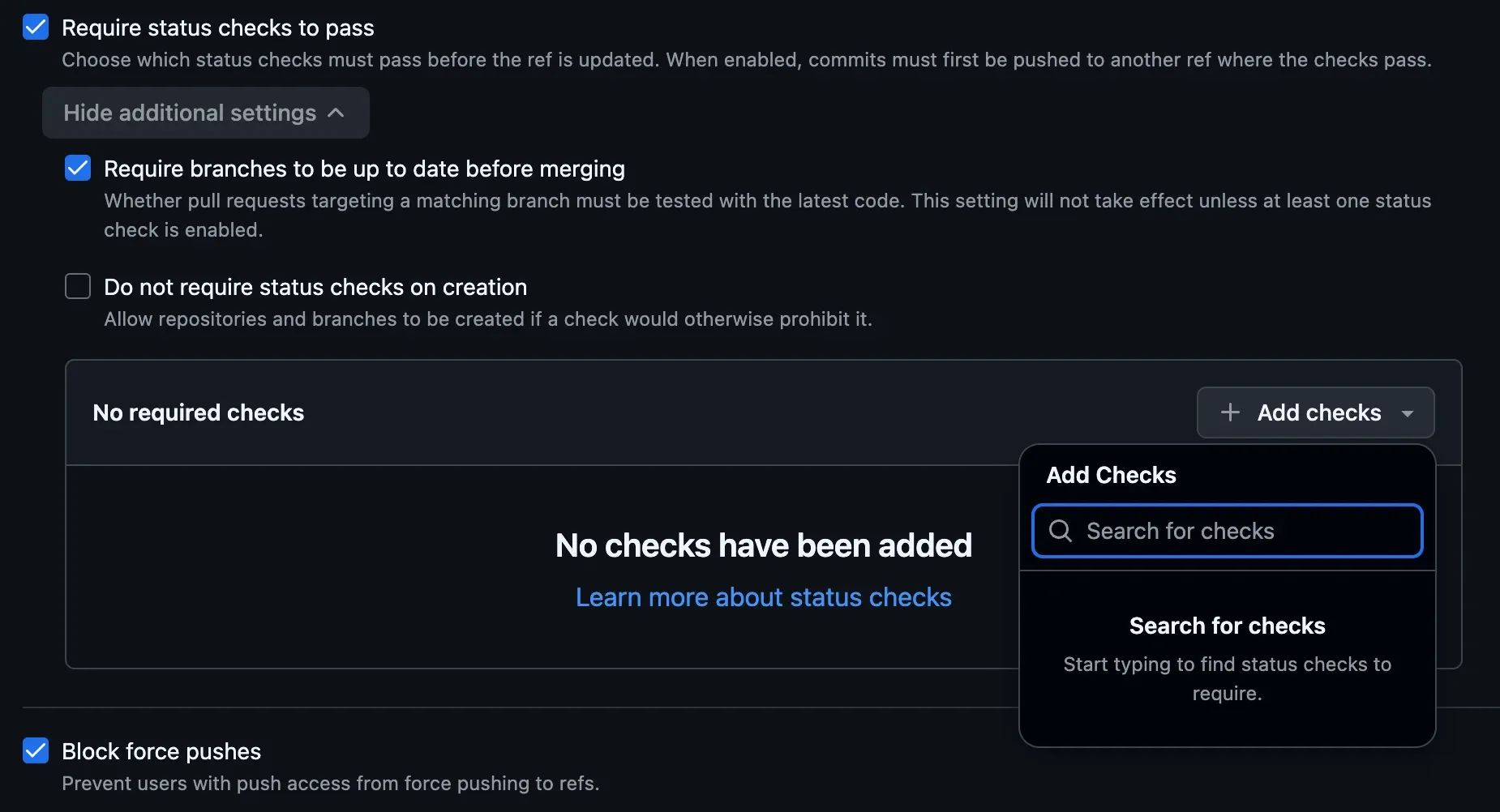
Either way it needs at least one required check selected, since there is nothing to re-run otherwise.
The checkbox that only suggests
Settings → General → Pull Requests has a setting with a similar name that does something weaker:
Always suggest updating pull request branches Whenever there are new changes available in the base branch, present an “update branch” option in the pull request.

It adds the button and nothing else. A pull request that is behind can still merge with it on, so it would not have stopped the merge in the timeline above.
A baseline for main, and where each rule bites
The rules below are a starting point for main on a repository where several people merge pull requests. Each row says what the rule stops; drop the ones whose failure you can live with.
| Rule | What it stops |
|---|---|
| Require a pull request before merging | Direct pushes to main that skip review and CI |
| Require approvals, and dismiss stale approvals when new commits are pushed | Merging unreviewed code, and an approval surviving changes made after it |
| Require status checks to pass, with each check named | Merging a pull request whose CI is red |
| Require branches to be up to date before merging | Merging a green result computed against an older main |
| Require conversation resolution before merging | Merging while review threads are still open |
| Block force pushes, and restrict deletions | Rewriting or deleting main’s history |
| Do not allow bypassing the above settings (classic), or keep the ruleset’s bypass list empty | Admins merging past every rule above |
The repository in this story applied its rules to non-admins only, so even a complete rule set would not have covered a merge made by an admin.
Required checks have to name the right job
A required check is matched by name. In this repository, two workflows each had a job named check, one for the application code and one for the infrastructure code, and the branch rule listed a single required check called check. From that list alone, there is no way to tell which workflow it means.
Give every job a name that is unique across workflows, such as app-check and infra-check, and require each one by that name.
Renaming a job that is already required
Renaming a required job needs an order. The pull request that renames it stops reporting the old name, so while the old name is still required, that pull request waits on a check that will never arrive.
Removing the old requirement first would merge it, but leaves main with no required check until the new names are added.
The order that kept main covered the whole time:
- Open the rename pull request and let its CI run once, so the new check names exist. The settings page only offers checks it has seen: its search box reads “Search for status checks in the last week for this repository”.
- Replace the old required check with the new names, and turn on Require branches to be up to date before merging in the same edit.
- Merge the rename pull request. Its CI already reported the new names, so it passes the new requirement.
- Update the other open pull requests. Until their CI runs again, the new checks show as “Expected — Waiting for status to be reported” and the merge stays blocked.
Leaving path-filtered workflows out
A workflow with a paths: filter cannot be a required check. GitHub’s troubleshooting guide says that when a workflow is skipped by path filtering, its checks “stay in a ‘Pending’ state and block merging”. A pull request that only edits documentation would then never be mergeable. Leave path-filtered workflows such as image builds out of the required list.
Merge queue, and when it is available
A merge queue automates the update-and-retest loop. Instead of each author pressing Update branch and waiting, the queue builds a temporary branch with the latest main plus the queued pull requests, runs CI on it, and merges only if it passes. GitHub describes it as providing the same guarantee as requiring branches to be up to date.
Two conditions apply. Merge queues are available in public repositories owned by an organization, and in private repositories only on GitHub Enterprise Cloud, so a private repository on the Team plan does not get one. And every workflow that a required check comes from has to trigger on the merge_group event, or the queue waits for checks that never start:
on: pull_request: merge_group:Without a merge queue, requiring branches to be up to date gives the same protection with a manual update step.
Summary
A green check on a pull request says the pull request worked against main as main was when CI ran. Two pull requests can each be green against their own snapshot and still break main together, and Git will not warn you when they touch different files.
Require branches to be up to date before merging moves that question to merge time: a pull request behind main has to be updated and pass CI again first. It sits under the required status checks rule, and the similarly named “Always suggest updating pull request branches” only adds a button.
It works best alongside required pull requests and reviews, uniquely named required checks, and no bypass for admins.
References
- About protected branches (GitHub Docs)
- About rulesets (GitHub Docs)
- Available rules for rulesets (GitHub Docs)
- Troubleshooting required status checks, including skipped path-filtered workflows (GitHub Docs)
- Managing a merge queue (GitHub Docs)
- Events that trigger workflows: pull_request and merge_group (GitHub Docs)