SNS alerts in Slack with Amazon Q Developer — one message, a different body per subscription protocol
Amazon Q Developer drops plain-text SNS messages. Publishing with MessageStructure=json sends email plain text and Slack a custom notification from one call.
On this page
Introduction
Every alert from a document translation pipeline I run on AWS arrives as an SNS email, and I wanted the error alerts in the team’s Slack channel as well. Amazon Q Developer in chat applications (formerly AWS Chatbot) connects an SNS topic to Slack without code, so I tried it in my own workspace before rolling it out to production.
The CloudWatch alarms arrived, and every message my own code published was silently dropped, because Amazon Q Developer accepts only its own custom-notification JSON.
The fix is one SNS message published with MessageStructure=json, which gives email a plain-text body and Slack that JSON.
Every alert source still makes a single Publish call, and the alarms reach Slack untouched.
How the alerts reach Slack
Amazon Q Developer in chat applications is set up per channel configuration, and each one holds three settings:
- Slack channel: the one channel that receives the alerts.
- SNS topics: the topics whose notifications reach that channel. There can be several.
- IAM role: the role that commands typed in that channel run as.
Creating a channel configuration subscribes Amazon Q Developer to each topic over HTTPS, beside the email subscriptions the topics already had.
Two steps stay manual:
- Approving the AWS app: someone with access to the Slack workspace approves it on an OAuth screen. That screen starts from the Amazon Q Developer console, which runs only in US East (Ohio).
- Inviting it to a private channel: someone types
/invite @Amazon Qin the channel, or nothing is delivered there.
Everything else is CDK.
SlackChannelConfiguration from aws-cdk-lib/aws-chatbot takes an optional role. The code below leaves it out, so CDK creates a role with a trust policy and no permissions, and I added ReadOnlyAccess as a guardrail, an IAM policy that caps what any command in the channel can do, whatever the role allows.
The channel only receives alerts: a command typed at @Amazon Q in it can change nothing in the account.
new chatbot.SlackChannelConfiguration(this, 'SlackAlerts', { slackChannelConfigurationName: 'dev-alerts', slackWorkspaceId: 'T0123456789', slackChannelId: 'C0123456789', notificationTopics: [notificationTopic, opsAlertTopic], guardrailPolicies: [iam.ManagedPolicy.fromAwsManagedPolicyName('ReadOnlyAccess')], loggingLevel: chatbot.LoggingLevel.ERROR,});The stack lives in Tokyo, and the configuration deployed from it without a separate US stack, even though the Amazon Q Developer console is Ohio-only.
Why a plain-text SNS message never reached Slack
Amazon Q Developer drops a plain-text SNS message, and leaves only one log line:
Event received is not supported (see https://docs.aws.amazon.com/chatbot/latest/adminguide/related-services.html ): {"type":"Notification", … "message":"TEST1b: …", …}Amazon Q Developer formats the notifications of the AWS services it supports, such as CloudWatch alarms, and expects anything else in its custom-notification format.
A custom notification is a JSON object with version set to "1.0", source set to "custom", and a content.description:
{ "version": "1.0", "source": "custom", "content": { "textType": "client-markdown", "title": ":x: [prod] Translation failed", "description": "*File ID*: `123456`" }}Every custom notification arrives with a fixed footer, “Custom notification delivered by Amazon Q Developer”, and the format has no field that removes it.
One message, a body per subscription protocol
MessageStructure=json lets one Publish call carry a different body for each subscription protocol.
The Message becomes a JSON object whose keys are protocol names and whose values are strings.
default is required and serves any protocol without its own key, and https serves HTTPS subscribers, which is how Amazon Q Developer subscribes.
def publish_notice(client, *, topic_arn: str, notice: Notice) -> None: message = { "default": email_text(notice), "https": json.dumps(slack_notice(notice), ensure_ascii=False), } client.publish( TopicArn=topic_arn, Subject=subject_safe(notice.subject)[:99], Message=json.dumps(message, ensure_ascii=False), MessageStructure="json", )The https value is JSON inside a JSON string, so it is encoded twice.
Email gets the default body and the Subject, as before.
The https body reaches every HTTPS subscriber, not only Amazon Q Developer.
Today Amazon Q Developer is the only one.
A webhook subscribed to the same topic later would receive the custom-notification JSON too, so I left that warning as a comment beside the key.
One Notice, rendered for email and for Slack
The places in the pipeline that publish alerts fall into two main groups:
- A failed attempt: a job such as a translation failed and will be retried.
- Retries used up: a job ran out of retries and landed in the dead-letter queue, whose notifier sends the alert.
I made each of them build one Notice and pass it to publish_notice(), which renders it once for email and once for Slack.
@dataclass(frozen=True)class Notice: title: str # deployment name label: str # "Translation failed" lead: str severity: Severity = "warning" target: str = "" # email subject only fields: tuple = () # email and Slack email_fields: tuple = () # email only notes: str = "" blocks: tuple = () # email and Slack email_blocks: tuple = () # email only next_steps: tuple = () thread_id: str = ""Keeping file names out of Slack
File names and anything taken from inside a file stay in email. The rule for this project is that file names and file contents do not go to Slack.
Notice has three fields that only the email uses:
target: text that appears only in the email subject, such as the file name.email_fields: label and value pairs that appear only in the email body, such as “File: report_v2.docx”.email_blocks: whole blocks of text that appear only in the email body, such as a spreadsheet’s column headers or the original queue message.
slack_notice() never reads these three fields, so none of that reaches Slack. Where something was left out, the Slack message ends with a line saying the details are in the email.
next_steps maps to the custom format’s nextSteps, which Slack shows as a bulleted list under a “Next steps:” label.
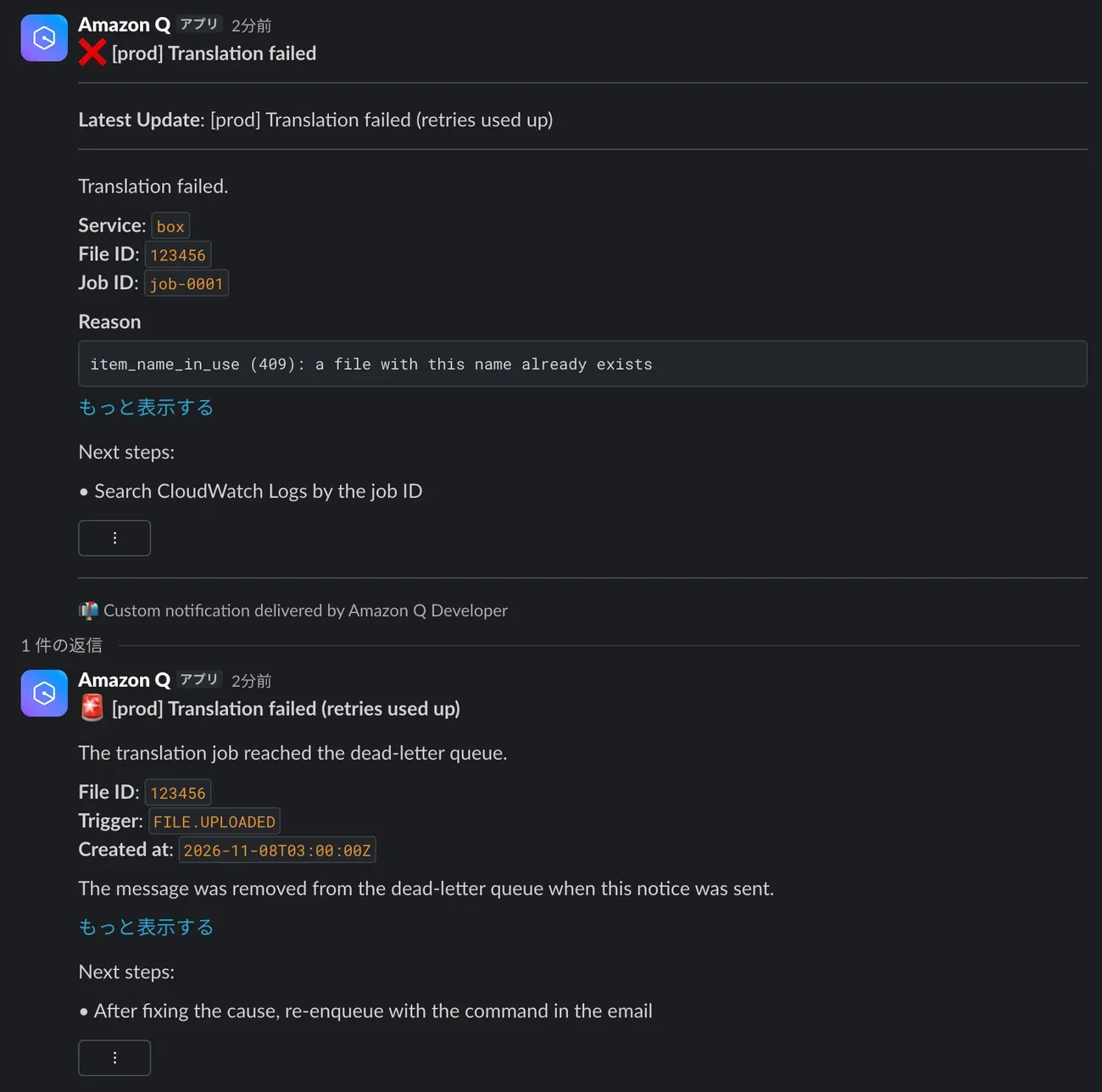
severity picks the emoji in the Slack title, so a single failed attempt shows ❌ and a job that used up its retries shows 🚨.
Grouping a file’s failures into one thread per day with threadId
thread_id maps to metadata.threadId, and Amazon Q Developer posts a message as a reply when it carries an ID it has seen.
I use the job’s key as the ID (such as box#123456, made of the source service and the file ID), so a file’s per-attempt failures and its dead-letter notice land in one thread.
By default, Amazon Q Developer threads messages with the same ID that arrive within 2 days. So I made slack_notice() append the date in Japan time to the Slack thread ID, and a failure that comes back the next day starts a new thread:
payload["metadata"] = { "threadId": f"{notice.thread_id}#{_today()}", # box#123456#2026-11-05 "summary": _slack_escape(notice.heading),}summary is the line Amazon Q Developer adds to the thread’s first message as Latest Update when a reply arrives, so the channel shows the newest state without opening the thread.
Handling Slack’s own mrkdwn syntax
textType: "client-markdown" tells Amazon Q Developer that the text in title and description is Slack’s mrkdwn, Slack’s own markup in which *bold* and _italic_ format text.
Posting through Slack’s own API, you can switch formatting off with a plain_text text object or mrkdwn: false. Amazon Q Developer’s custom-notification format has no field for either, so there is no way to switch it off.
*v2* in a file name reaches Slack with its asterisks gone and v2 in bold.Every value is wrapped in backticks, so Slack shows it as inline code or a code block, where mrkdwn does not apply.
fields render as inline code and blocks as code blocks.
&, < and > are still escaped inside the backticks, because Slack uses them to mark links and mentions such as <@U123>, even inside inline code and code blocks. So I wrote two functions to handle this:
def _inline_code(value: str) -> str: # Collapse newlines to spaces and turn backticks into ', so the code span cannot end early; an empty value becomes - text = " ".join(value.split()).replace("`", "'") or "-" return f"`{_slack_escape(text)}`"
def _slack_escape(text: str) -> str: return text.replace("&", "&").replace("<", "<").replace(">", ">")An empty value becomes -, because an empty pair of backticks shows nothing in Slack and the message looks broken:
Left as is:      *Job ID*: ``Slack:           Job ID:          // nothing after it
Replaced with -: *Job ID*: `-`Slack:           Job ID: -        // - in an inline-code box
Inside a code block, three backticks in a value would end the block early, so they become three single quotes.
The custom format caps description at 8,000 characters. Escaping can make a value up to five times longer (& becomes &), so each code block is cut to 2,000 characters or fewer after escaping. A cut block is followed by a line pointing the reader to the email.
The email always carries the full text.
Summary
Error alerts from the pipeline now reach Slack as well as email, and every alert source still makes one Publish call.
- Send Amazon Q Developer its custom-notification JSON for anything other than a supported AWS event such as a CloudWatch alarm. Plain text is dropped, leaving only
Event received is not supportedin a us-east-1 log. MessageStructure=jsongives each subscription protocol its own body, sodefaultcarries plain text to email andhttpscarries the JSON to Amazon Q Developer.- Build each alert once as a
Noticeand letpublish_notice()render it for email and for Slack. File names and file contents go in email-only fields, so they never reach Slack. - mrkdwn has no escape for
_and*, so every value in a Slack message is wrapped in backticks. Slack still reads&,<and>as markup inside the backticks, so those are escaped as well. - A thread ID with the date in it groups one file’s failures for a day and starts a fresh thread when a failure recurs.
- Logging at
ERRORkeeps message bodies out of the us-east-1 log group.