Terraform import blocks take over a console-built AWS prod — console names kept, deletes refused in CI
Moving a console-built AWS data layer into Terraform with import blocks, keeping its console names, and applying prod by hand behind a check that stops deletes.
On this page
Introduction
The test account of an AWS data layer I work on is built by Terraform, from a module written against a read-only capture of prod. The previous article covers how, and it said the same module could run against prod with “only one more tfvars file”.
Prod itself was still built and changed by hand in the console. I wanted prod defined by the same module, with applies I start by hand. The first read-only terraform plan against prod wanted to destroy seven resources, because the console had named them differently from the module.
Prod now imports its existing resources and keeps the console’s names, and it applies only from a workflow I start by hand, which refuses any plan containing a delete. The repository now defines both accounts, and merging to main never changes prod.
One module, two roots, two ways to apply
Both accounts run the same data-layer module, each from its own root directory with its own state. State is the file where Terraform records which resources it manages; each root has its own, so the two accounts’ resources never mix. A root is the directory terraform plan runs in, and it holds three things:
- The backend, which says where state is stored, such as an S3 bucket.
- The provider, which sets the AWS account Terraform works in, pinned to one account per root.
- The
moduleblock, which calls the data-layer module with that account’s values.
modules/ bootstrap/ state bucket and the GitHub Actions roles, shared by both accounts data-layer/ S3, Glue, OpenSearch Serverless, Bedrock knowledge bases, Lambda, AgentCorebootstrap/ test/ prod/envs/ test/ main.tf prod/ main.tf, imports.tfThe prod root differs from the test root in two places:
imports.tfpoints the module’s resources at the ones already in prod.main.tfpasses the module the names the console gave those resources.
Every pull request gets a plan for both accounts. The test account applies when a pull request merges to main; prod applies only when I start the workflow by hand, and that run fails before applying anything if its plan would delete a resource.
A console edit to prod therefore shows up in the next pull request’s prod plan as a difference from the code, and the next prod apply changes it back, unless changing it back would delete a resource, which the check refuses.
Rehearsing the takeover of prod’s resources with a read-only plan
An import block plus a local backend lets terraform plan show what taking over prod would do, without writing anything to prod. An import block names an existing resource and the module address that should own it; plan reads the live resource, compares it with the configuration, and reports the difference before anything is imported.
I collected the IDs with List, Get and Describe calls and wrote one import block per resource. for_each covers the repetitive ones:
import {  to = module.data_layer.aws_bedrockagent_knowledge_base.this["handbook"]  id = "KBID000001"}
import {  to = module.data_layer.aws_bedrockagent_data_source.this["handbook"]  id = "DSID000001,KBID000001"}
import {  for_each = local.buckets  to       = module.data_layer.aws_s3_bucket.this[each.key]  id       = each.value}
The backend in prod’s main.tf stores state in an S3 bucket that did not exist yet, so terraform plan could not start, and a rehearsal should not write prod state anyway.
Terraform lets the settings in any file whose name ends in _override.tf replace the matching settings elsewhere, and a backend block in an override file takes precedence over the original. One temporary file therefore sends state to local disk, so main.tf stays untouched and no S3 bucket is needed:
terraform { backend "local" { path = "/tmp/prod-rehearsal.tfstate" }}With prod credentials, plan reads every resource and changes nothing in the account:
INaws-vault exec prod -- terraform -chdir=terraform/envs/prod plan -lock=falseOUTPlan: 44 to import, 17 to add, 23 to change, 7 to destroy.Once the prod state bucket existed, I deleted the override file, and the same command ran against the S3 backend.
Why the plan replaced seven resources
Six of the seven were replaced because their names differed. When I created each resource in the console, the console generated its name, and the module builds a different one from its own rule. The seventh was an inline policy, replaced because its role was.
Terraform cannot rename a knowledge base data source or an IAM role in place, so a different name means creating a new resource and deleting the old one:
# module.data_layer.aws_bedrockagent_data_source.this["catalog"] must be replaced    ~ name = "knowledge-base-quick-start-xxxxx-data-source" -> "app-catalog-s3" # forces replacement
# module.data_layer.aws_iam_role.kb["catalog"] must be replaced ~ name = "AmazonBedrockExecutionRoleForKnowledgeBase_xxxxx" -> "app-kb-catalog" # forces replacement| Resource | Replaced | What a replacement costs |
|---|---|---|
| Knowledge base data sources | 2 | A new data source ID, and every document ingested again |
| IAM roles for the knowledge bases, the Lambda and the gateway | 4 | The new role exists before anything points at it, so calls can fail with AccessDenied until the switch propagates |
| The Lambda role’s inline policy | 1 | Recreated along with its role |
One knowledge base carried an aws-apn-id tag the module does not declare, so the plan would have removed it. The AgentCore service-linked role was planned as a create, but prod already had one, so the apply would have failed creating it.
The data source named after its knowledge base
The module built each data source’s name from its knowledge base’s name. When I renamed a knowledge base in the console and updated the module to match, the plan listed the knowledge base as an in-place update. The data source’s name changed with it, and a data source cannot be renamed in place, so the plan would replace it.
I gave each data source a fixed name of its own instead of building it from the knowledge base name:
resource "aws_bedrockagent_data_source" "this" { name = "${replace(each.value.name, "_", "-")}-s3" name = each.value.data_source_name # …}With that change, the test plan went from 1 to add, 1 to change, 1 to destroy to 0 to add, 1 to change, 0 to destroy.
Keeping the console’s names with existing_names
I added one optional variable that holds the names the console chose, and every name in the module falls back to its own rule when the variable is empty. Test passes nothing and keeps its names; prod passes the console’s:
variable "existing_names" { type = object({ data_sources = optional(map(string), {}) kb_roles = optional(map(string), {}) reviewer_role = optional(string) gateway_role = optional(string) }) default = {}}resource "aws_iam_role" "kb" { name = lookup(var.existing_names.kb_roles, each.key, "${local.prefix}-kb-${each.key}") # …}The two remaining problems, the aws-apn-id tag and the service-linked role, took one line each. ignore_changes = [tags["aws-apn-id"]] on the knowledge base leaves that tag alone, and an import block for the service-linked role turns its create into an adoption.
INaws-vault exec prod -- terraform -chdir=terraform/envs/prod plan -lock=falseOUTPlan: 45 to import, 9 to add, 28 to change, 0 to destroy.The nine adds change nothing that exists. They fall into four kinds:
- Three inline policies on the adopted roles
- Two policy attachments on the same roles
- One more OpenSearch data access policy
- The
terraform_datathat makes sure the index exists, and thetime_sleepafter it
The test plan still printed No changes. Your infrastructure matches the configuration.
Why I kept the resources’ old names
At the time I decided, the reason was the permission window. Migrating to the module’s names means Terraform creates each new role, points the knowledge base, Lambda or gateway at it, and deletes the old one, and any call in between can fail.
Keeping the names had a cost. Every adopted role carries the console’s managed policies alongside the module’s inline policy, the same permissions twice. I added that to the snapshot diff’s expected-differences list, EXPECTED_DIFFS, with the reason beside it.
Applying prod by hand, behind a delete check
Prod applies only from a workflow_dispatch run with target: prod, and the job applies the exact plan it checked. workflow_dispatch is the GitHub Actions trigger for a run started by hand, and the choice input keeps the test path unchanged:
on:  workflow_dispatch:    inputs:      target:        description: apply する環境        type: choice        options: [test, prod]        default: test
jobs:  apply-prod:    if: github.event_name == 'workflow_dispatch' && inputs.target == 'prod'    environment: prod    env:      TF_DIR: terraform/envs/prod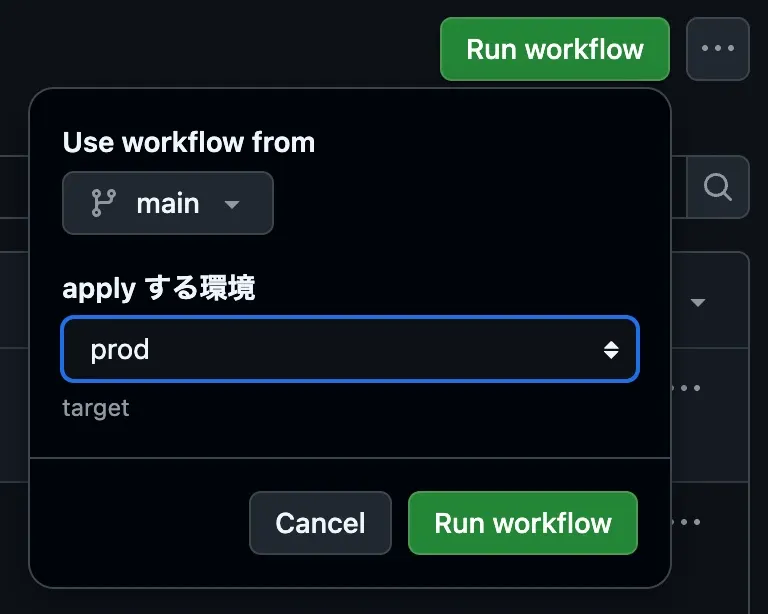
The prod environment deploys only from main, set with a deployment branch policy exactly as the previous article did for test. It has no required reviewers, so no one has to approve the run. The AWS apply role trusts only that environment’s subject.
The check reads the saved plan as JSON and fails on any resource whose actions include delete. Terraform’s JSON format writes a replacement as ["delete", "create"] or ["create", "delete"], and its documentation says those shapes exist so a caller can scan for delete and catch all three deleting cases:
["delete"]: deletes the resource only.["delete", "create"]: replaces it by deleting the old resource first, which is Terraform’s default.["create", "delete"]: replaces it by creating the new resource first, for a resource withcreate_before_destroyset.
The check in the workflow:
- name: terraform plan  run: terraform -chdir="$TF_DIR" plan -input=false -no-color -lock-timeout=10m -out=tfplan
- name: Refuse deletes and replacements  run: |    terraform -chdir="$TF_DIR" show -json tfplan > plan.json    jq -r '.resource_changes[] | select(.change.actions | index("delete")) | "\(.change.actions | join("/")) \(.address)"' plan.json > destructive.txt    if [ -s destructive.txt ]; then      echo "::error::refusing to apply a plan that deletes or replaces resources"      cat destructive.txt      exit 1    fi
- name: terraform apply  run: terraform -chdir="$TF_DIR" apply -input=false -no-color -lock-timeout=10m tfplan
Applying tfplan instead of re-planning means the resources that passed the check are the ones that change. If state moved in between, Terraform refuses the stale plan.
I turned the bootstrap root that creates the state bucket and the two GitHub roles into a shared module, modules/bootstrap. Moving test’s resources into it took 13 moved blocks, which tell Terraform a resource changed address rather than identity, and test’s bootstrap planned 0 to add, 0 to change, 0 to destroy. Prod’s bootstrap applied 13 new resources.
The first prod apply stopped on two OpenSearch policies
The first run imported all 45 resources, applied most updates, and then failed on the two OpenSearch Serverless security policies:
Error: updating OpenSearch Serverless Security Policy
  with module.data_layer.aws_opensearchserverless_security_policy.encryption,  on ../../modules/data-layer/opensearch.tf line 10, in resource "aws_opensearchserverless_security_policy" "encryption":  10: resource "aws_opensearchserverless_security_policy" "encryption" {
ID: <collection-name>Cause: operation error OpenSearchServerless: UpdateSecurityPolicy, ,ValidationException: No changes detected in policy or policy description"
The console had written a description on both policies, and the module declares none. Terraform sent an update with the description cleared and the policy unchanged, and OpenSearch Serverless’s UpdateSecurityPolicy API rejected it as a request that changes nothing. The delete check had passed, because an update is not a delete.
Nothing was deleted, and what had succeeded stayed applied. Terraform applies resource by resource. The roles, the security group rules, the Glue tables and the Lambda update were done, and the resources that depend on the collection had not started.
I stopped managing the descriptions, on both policies and on the collection, whose description the console had also written:
resource "aws_opensearchserverless_security_policy" "encryption" {  name   = local.collection_name  type   = "encryption"  policy = jsonencode({ /* rules and key settings, omitted */ })
  # The console wrote a description; clearing it is rejected by the UpdateSecurityPolicy API.  lifecycle {    ignore_changes = [description]  }}
The pull request’s prod plan showed what was left, and the second run applied it:
Apply complete! Resources: 5 added, 3 changed, 0 destroyed.The plan after the second apply printed No changes. Your infrastructure matches the configuration.
Summary
Prod and test now run the same data-layer module, and prod applies only from a run I start by hand. Before anything touched prod, a read-only plan (import blocks, a local state override, read-only credentials) showed the seven replacements the takeover would have made.
The console names resources its own way, so the module now takes those names as input instead of renaming them. A name computed from another resource’s name gets a fixed value of its own, so renaming one resource cannot replace another.
Prod has no reviewer; the delete check guards it instead, and a saved plan that deletes any resource is never applied.
The check only looks for deletes, so it cannot catch an update that fails at apply time, like the security policies here. Fields the console filled in and the API refuses to clear, such as descriptions, therefore go under ignore_changes, and Terraform leaves them alone.
References
- Terraform: import blocks, including for_each
- Terraform: override files, and how a backend block in one takes precedence
- Terraform: the lifecycle meta-argument and ignore_changes
- Terraform JSON output format, including the actions values for a replacement
- Terraform: moved blocks for refactoring modules
- GitHub Docs: deployments and environments, including deployment branch policies
- OpenSearch Serverless API: UpdateSecurityPolicy